The resident’s medical record
The resident’s medical record is the care part of the resident’s form, opened from Nursing Care → Residents → All Residents (or from the Residents app). It is spread over the tabs Care, Treatments, Wishes and Documents, and over a row of buttons at the top of the form.
Access restricted to care staff
The care tabs, buttons and badges are only shown to care staff, and only for a person followed in care. Changes to medical data are logged (traceability and data protection).
The buttons at the top of the form
In the header:
Create the care plan — shown while the resident has no plan in force; it opens a new plan. Once a plan exists, the button reads Care Plan and opens it. It is not offered for a resident who has left for good or has died. See Care plans.
Vital Signs — records a set of measurements; Trends draws their curves. See Observations and vital signs.
Hospital departure (or Return from hospital while the resident is in hospital) — see Hospital departure and return.
The smart buttons count and open:
Button |
Opens |
|---|---|
Treatments |
The resident’s treatments |
Pharmacy’s Deliveries |
The pharmacy’s sachets received for the resident |
Observations |
The resident’s observations, as a list |
History |
The same observations on a calendar |
Scheduled |
The care tasks still planned |
Care (2 yrs) |
What was planned, done and missed over this year and the previous one |
The Care tab
Measurements and dependency
Field |
Purpose |
|---|---|
Blood Type |
The resident’s blood type |
Height (cm) |
Entered once |
Weight (kg) |
Read-only: the last weight recorded in the vital signs |
BMI |
Calculated from weight and height |
Weight goes through the vital signs
Use Vital Signs at the top of the form, or the small + next to the weight. The BMI then recalculates on its own.
The Dependency group shows, read-only, the Active Care Plan and, when the country pack provides a dependency scale, the current dependency category.
In Belgium
The Dependency group shows the current Katz category and the end of validity of the Katz assessment, and a Katz button opens the assessments. See Care in Belgium.
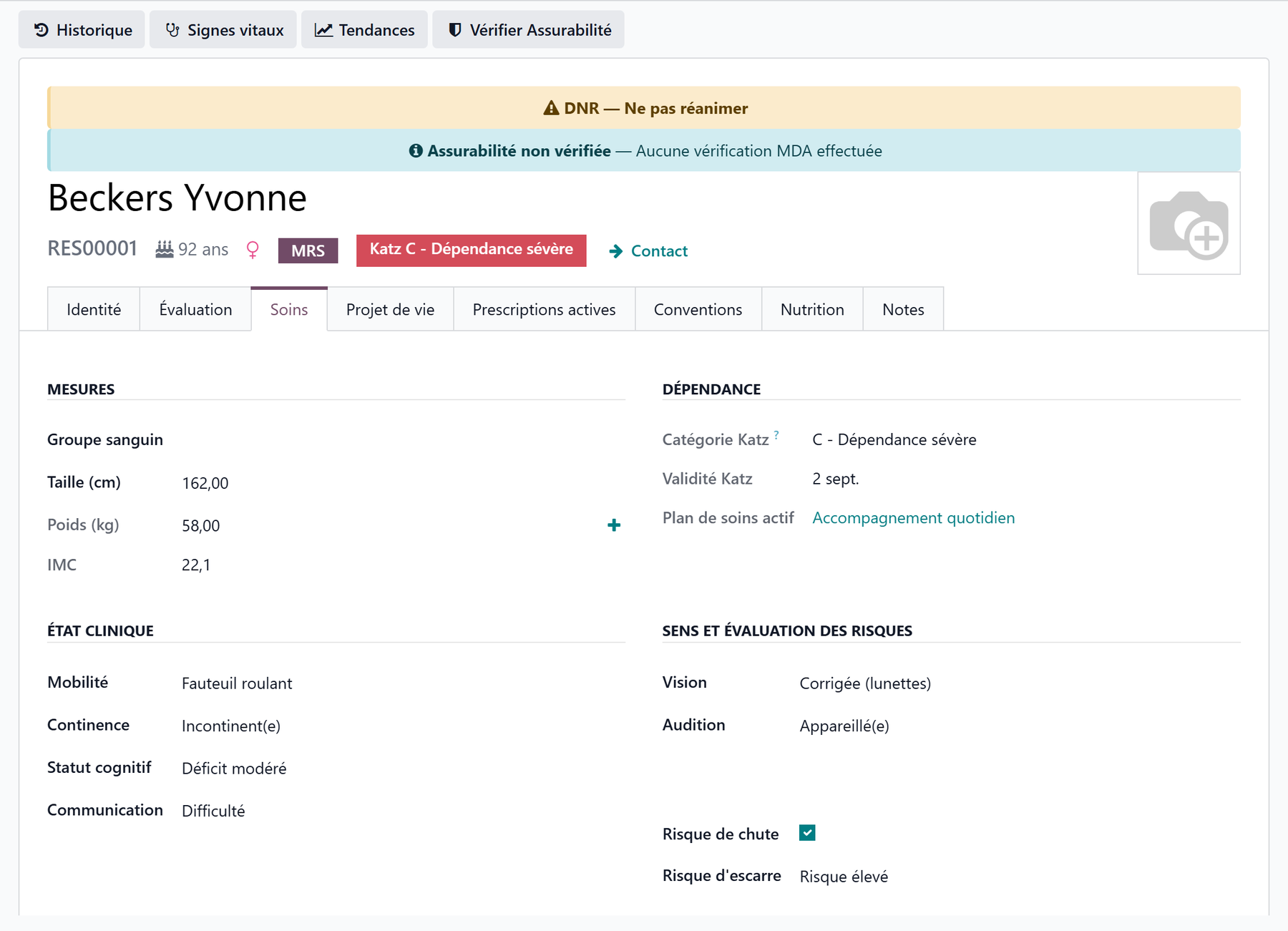
Clinical status, senses and risks
Field |
Values |
|---|---|
Mobility |
Autonomous · Cane · Walker · Wheelchair · Bedridden |
Continence |
Continent · Occasional Incontinence · Frequent Incontinence · Incontinent |
Cognitive Status |
Normal · Mild Impairment · Moderate Impairment · Severe Impairment |
Communication |
Normal · Difficulty · Non-verbal · Aphasia |
Vision |
Normal · Corrected (Glasses) · Impaired · Blind |
Hearing |
Normal · Hearing Aid · Impaired · Deaf |
Fall Risk |
Yes / No |
Pressure Sore Risk |
Low · Moderate · High |
Medical devices
Urinary Catheter, Stoma and Gastric Tube (yes / no);
Dental Status: Natural Teeth · Partial Denture · Full Denture · Edentulous.
The devices also appear on the resident’s Nutrition care tasks, where they change how the meal is given. See Care tasks.
Stools and urine
Two groups, Stools and Urine, show the status of the follow-up (Not recorded, Up to date, To watch, Alert), with Record stools, Record urine and History. See Stools and urine.
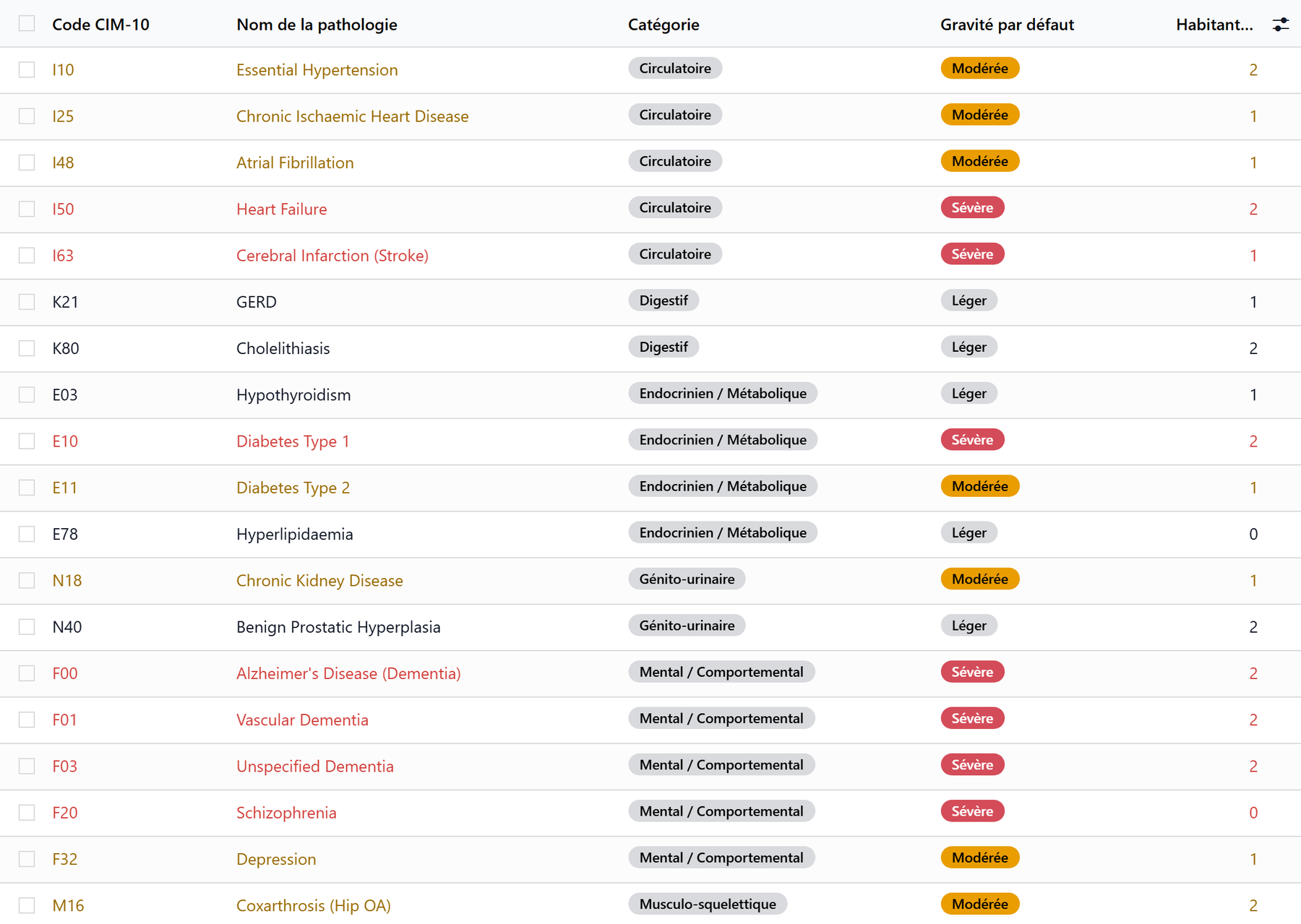
Diagnoses (ICD-10 pathologies)
The Diagnoses / Pathologies list links the resident to pathologies of the ICD-10 catalogue.
Column |
Purpose |
|---|---|
Pathology |
The pathology from the catalogue |
Category |
Taken from the catalogue |
Severity |
Mild · Moderate · Severe, for this resident |
Status |
Active or Resolved |
Confirmed |
Clinically confirmed (yes / no) |
Date |
Date of diagnosis |
Notes |
Clinical observations |
A pathology can only be recorded once per resident. The same list is edited from the Pathologies tab of the care plan.
Allergies
Column |
Purpose |
|---|---|
Allergen |
The allergen from the catalogue |
Category |
Drug · Food · Environmental · Contact · Insect/Venom |
Severity |
Low · Medium · High · Critical, for this resident |
Confirmed |
Clinically confirmed (yes / no) |
Date |
Date identified |
Reaction |
Description of the reaction |
Drug allergens protect prescribing
For a drug allergen, Critical blocks the prescription of the medicine concerned; High, Medium or Low shows a warning. See Prescriptions and medicines.
Additional Allergy Notes holds, in free text, what is not in the list.
Medical contacts and notes
Specialist Doctors — one or more doctors.
Medical Notes — anything important that fits nowhere else.
The Attending Physician and the resident’s pharmacist are set on the Identity tab, with the administrative record.
The Treatments tab
The resident’s running treatments, the same as in the medicines workstation. Add a line opens a new treatment; a treatment is stopped, never deleted. See Prescriptions and medicines.
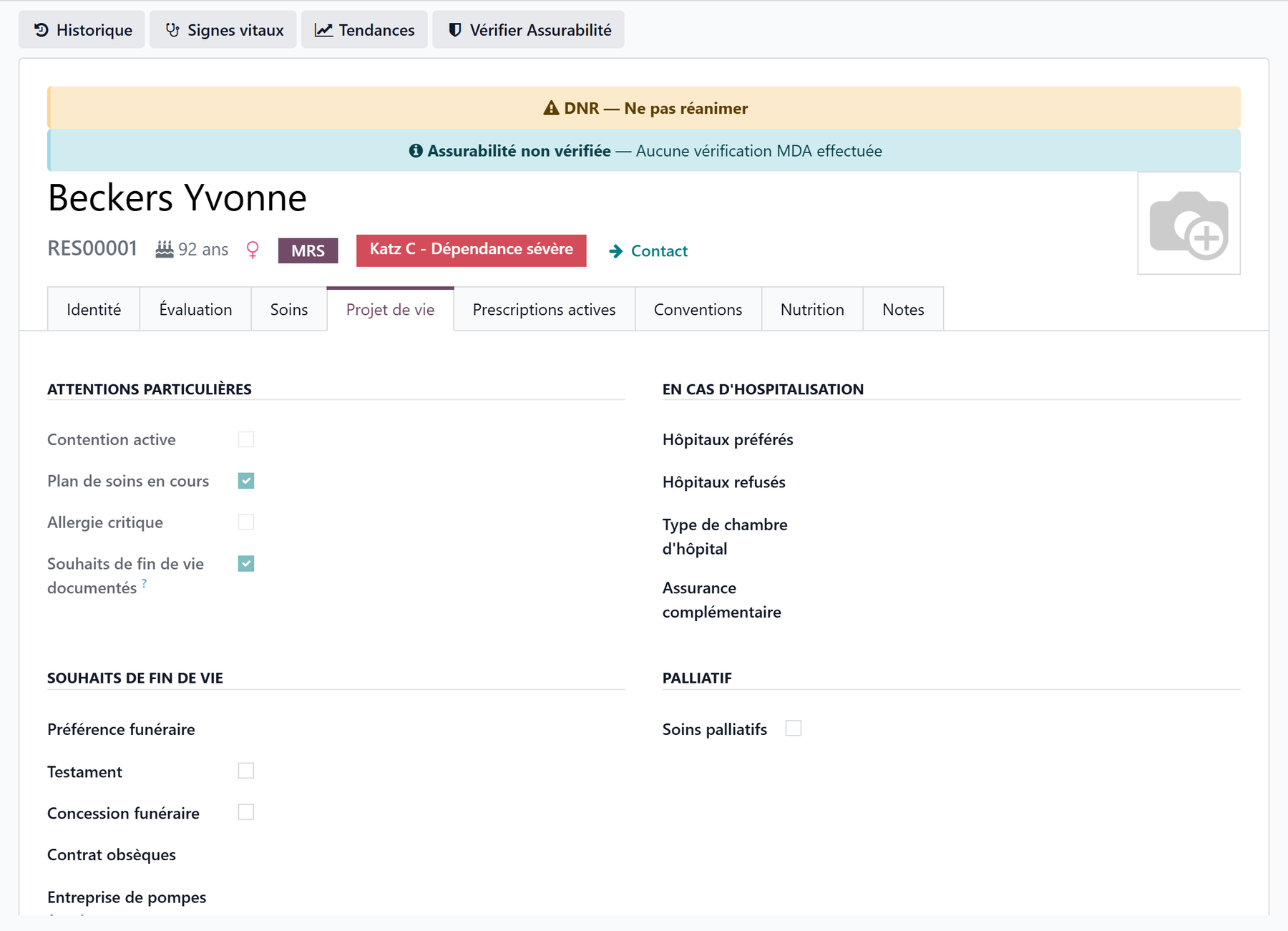
The Wishes tab
What the resident wants for a hospitalisation and for the end of life:
Advance Directives — Has Advance Directive (with its content) and DNR Order (Do Not Resuscitate).
Special Attentions — Active Restraint, Ongoing Care Plan, Critical Allergy and End-of-life Wishes Documented: flags taken from the record.
In Case of Hospitalisation — preferred and refused hospitals, room type, complementary insurance.
End-of-life Wishes — funeral preference, will, burial concession, funeral contract, funeral home, notary.
Palliative — palliative status, its start date, and whether the resident and their representative agreed.
Instructions — end-of-life and hospitalisation instructions.
These wishes are usually gathered with the anamnesis, which writes into the same fields.
The DNR is flagged everywhere
As soon as DNR Order (Do Not Resuscitate) is ticked:
an orange banner “DNR — Do Not Resuscitate” appears at the top of the resident’s form;
a DNR badge shows on the resident’s card and a DNR column in the list;
a DNR filter finds the residents concerned.
Badges on the resident’s card
On the residents’ kanban, care staff also see: Restraint, Critical allergy, Advance directives, No care plan and Undernutrition.
The Documents tab
The care tiles of the Documents tab:
Medical Record — the record as a PDF: Summary (current state) or Full (state and history over a period, with From and To). Tick the sections — medical summary, advance directives, care plan, treatment history, administration history, vital sign curves, clinical assessments, record reviews, observations — and click Export PDF.
Medication Sheet — what the resident takes, on one page.
Liaison Pack — for the hospital: treatments, allergies, directives.
Key points to remember
The medical record is the Care tab, with Treatments, Wishes and Documents; it is reserved for care staff and logged.
The weight comes from the vital signs; the BMI is calculated.
ICD-10 diagnoses and allergies carry a severity specific to the resident; drug allergens protect prescribing.
Advance directives and the DNR live in the Wishes tab and are flagged on the form, the card and the list.