Geriatric assessments
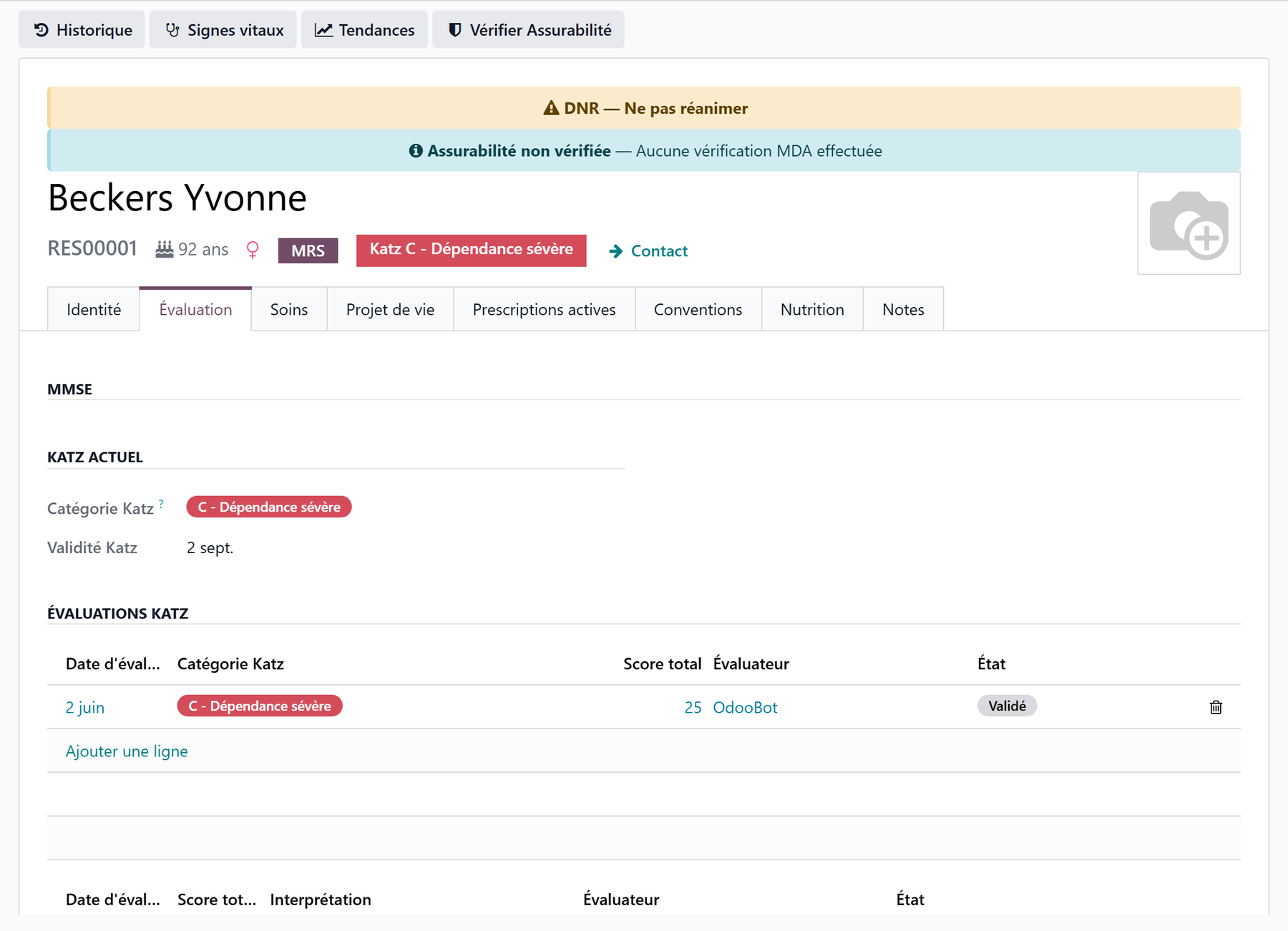
Beyond the dependency assessment, which follows each country’s scale, WideCare gathers the main geriatric scales of the nursing home, to measure cognition, pressure ulcer risk, nutrition, oral health, falls and pain. You find them in two places:
on the resident’s record, the Evaluation tab: the history of each scale and direct entry — shown to the care roles;
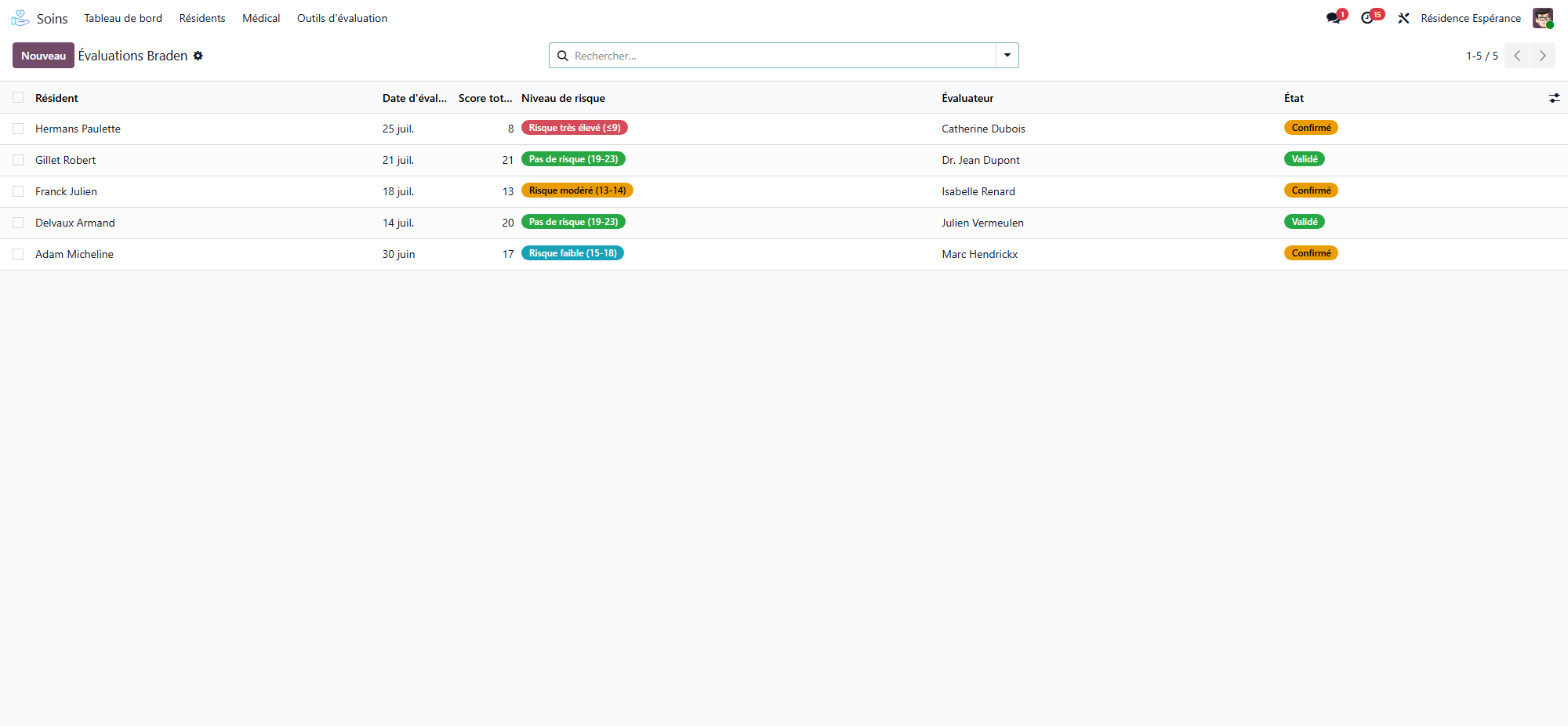
in Nursing Care → Evaluation Tools, one list per scale for the whole house.
Available scales
Scale |
What it measures |
Score |
Reading |
|---|---|---|---|
MMSE |
Cognitive function |
/30 |
Higher = better |
Braden |
Pressure ulcer risk |
6–23 |
Lower = more at risk |
MNA |
Nutritional status |
/14 |
Lower = more at risk |
OHAT |
Oral health |
/16 |
Higher = more at risk |
Tinetti |
Balance and gait (falls) |
/28 |
Lower = more at risk |
Pain |
Pain, self-reported or observed |
/10 or /30 |
Higher = more pain |
The first five are on the resident’s Evaluation tab; Pain is entered from Nursing Care → Evaluation Tools, then Pain (EVA / DOLOPLUS-2).
The dependency category stays separate
The dependency scale determines the dependency category, on which the care allowance paid by the health insurer relies; it follows the country’s rules and its own renewal cycle. The scales on this page do not change that category.
In Belgium
The dependency scale is Katz, with its categories, its renewal due date and its reminders — see The Katz assessment.
MMSE — cognitive function
Menu: Nursing Care → Evaluation Tools, then MMSE (Mini Mental State).
The MMSE is a cognitive screening test out of 30 points. Tick each item passed, across 7 domains:
Domain |
Points |
|---|---|
Orientation in time |
5 |
Orientation in space |
5 |
Registration (3 words) |
3 |
Attention and calculation |
5 |
Recall (3 words) |
3 |
Language |
8 |
Visuo-constructive praxis |
1 |
Score |
Interpretation |
|---|---|
27–30 |
Normal |
21–26 |
Mild cognitive impairment |
11–20 |
Moderate cognitive impairment |
0–10 |
Severe cognitive impairment |
Braden — pressure ulcer risk
Menu: Nursing Care → Evaluation Tools, then Braden (Pressure Sore Risk).
Score 6 subscales: sensory perception (1–4), moisture (1–4), activity (1–4), mobility (1–4), nutrition (1–4), friction and shear (1–3). The total runs from 6 to 23. The lower the score, the higher the risk.
Score |
Risk level |
|---|---|
19–23 |
No risk |
15–18 |
Mild risk |
13–14 |
Moderate risk |
10–12 |
High risk |
9 or less |
Very high risk |
MNA — nutritional status
Menu: Nursing Care → Evaluation Tools, then MNA (Nutritional Assessment).
The MNA short form screens for malnutrition out of 14 points, from 6 questions: reduced food intake over 3 months (0–2), recent weight loss (0–3), mobility (0–2), acute illness or psychological stress (0 or 2), neuropsychological problems (0–2) and body mass index (0–3).
Score |
Nutritional status |
|---|---|
12–14 |
Normal |
8–11 |
At risk of malnutrition |
0–7 |
Malnourished |
Nutritional follow-up
Weight, intake and hydration follow-up are part of the care and meals apps — see The clinical registers and Nutritional follow-up.
OHAT — oral health
Menu: Nursing Care → Evaluation Tools, then OHAT (Oral Health).
The OHAT scores 8 categories from 0 (healthy) to 2 (needs treatment): lips, tongue, gums and tissues, saliva, natural teeth, dentures, oral cleanliness and dental pain. The total runs from 0 to 16. The higher the score, the more concerning the situation.
Score |
Oral health |
|---|---|
0–3 |
Healthy |
4–8 |
Changes needed (refer to a dental professional) |
9–16 |
Unhealthy (urgent referral) |
Note
Natural teeth and Dentures offer N/A (not applicable), which is left out of the total.
Tinetti — balance, gait and fall risk
Menu: Nursing Care → Evaluation Tools, then Tinetti (Balance & Gait).
The Tinetti scale assesses balance (9 items, /16) and gait (/12), for a total out of 28. WideCare computes both subscores and the total.
Score |
Fall risk |
|---|---|
25–28 |
Low risk |
19–24 |
Moderate risk |
Under 19 |
High risk |
Note
The Morse fall-risk scale and the falls register are in the clinical registers.
Pain — EVA or DOLOPLUS-2
Menu: Nursing Care → Evaluation Tools, then Pain (EVA / DOLOPLUS-2).
Choose the Scale:
EVA (self-reported) — the resident gives a score from 0 to 10;
DOLOPLUS-2 (observed) — for a resident who cannot say it, the team scores 10 behaviours from 0 to 3, for a total out of 30: Somatic Complaints, Protective Posture at Rest, Protection of Painful Areas, Facial Expression, Sleep, Washing / Dressing, Mobility, Communication, Social Life and Behaviour Problems.
Pain level |
EVA (/10) |
DOLOPLUS-2 (/30) |
|---|---|---|
No Pain |
0 |
under 5 |
Mild |
1–3 |
5–10 |
Moderate |
4–6 |
11–17 |
Severe |
7–10 |
18 and above |
Analgesia Indicated is ticked from 4/10 on EVA and from 5/30 on DOLOPLUS-2. The list filters on Pain Retained, EVA and DOLOPLUS-2, and groups by resident or by pain level.
Entering and validating an assessment
Every scale follows the same steps:
Open the scale — from the resident’s Evaluation tab, or from Nursing Home → Evaluation Tools.
New: the resident, the date (today) and the evaluator (you) are filled in. Score the items.
Confirm: the assessment moves from Draft to Confirmed.
Validate: the head nurse or the physician validates it; it moves to Validated, with the validator and the date.
graph LR
  A[Draft] --> B[Confirmed]
  B --> C[Validated]
  A --> D[Cancelled]
  B --> D
  C --> D
  D -->|Reset to Draft| A
  B -->|Reset to Draft| A
Correcting a validated assessment
A validated assessment is locked: its scores can no longer be edited, and it cannot be deleted — health data is kept. To correct it:
click Cancel;
the head nurse clicks Reset to Draft;
correct the scores, then Confirm and have it validated again.
Reset to Draft is offered on a confirmed or cancelled assessment, to the head nurse. A validated pain assessment is the exception: it has no Cancel, and Reset to Draft reopens it directly.
One assessment per day and per scale
A resident has one assessment per date and per scale; a cancelled one does not count, so it frees its day. The date cannot be in the future, nor after the resident’s death.
Assessments waiting for validation
Nursing Care → Medical → Assessments → Evaluations to Validate gathers, in one list, every assessment still in Draft or Confirmed, whatever the scale: resident, scale, date, evaluator and status. It filters on Draft, Confirmed and My Evaluations, groups by scale or resident, and leaves out deceased or archived residents. See Evaluations to validate.
Follow-up and reassessment
The Evaluation tab keeps the dated history of each scale: to reassess, enter a new assessment on a new date.
The dependency scale has its own renewal cycle, set by the country pack.
For a periodic reassessment cycle with a due date and a decision, use the clinical registers.
Some scales can also be entered at the bedside — see Assessments on mobile.
Key takeaways
Six scales: MMSE, Braden, MNA, OHAT, Tinetti on the Evaluation tab, and pain (EVA / DOLOPLUS-2) from the menu.
Reading: MMSE and Tinetti, high = favourable; Braden and MNA, low = at risk; OHAT and pain, high = concerning.
Draft → Confirmed → Validated; validation by the head nurse or the physician.
A validated assessment is locked and kept: cancel, then reset to draft to correct it.
One assessment per resident, per date and per scale.
Learn more
The clinical registers — falls (Morse), restraint, wounds, periodic reassessments.