The SAM medication database
SAM (Source Authentique des Médicaments, the authentic source of medicines) is the official Belgian medicines database. In WideCare it is the starting point of the house’s medicine catalogue: rather than typing a medicine in, you pick its package in SAM and the record fills itself.
SAM installs itself with the Belgian pack and the Care app. It works on a local copy of the SAM packages, searched by name and by CNK, available without any connection. When the house is connected to the central SAM service, the SAM data of each medicine (price, reimbursement, availability) is also refreshed every night.
Settings
In Nursing Care → Configuration → Settings, block SAM medicines:
Address and key — where the central SAM service is and the key that opens it. Test the connection, Synchronise now and Read everything next time sit below. Only CNK codes leave the database, never resident data.
Tariff — which SAM price and reimbursement to read: Public pharmacy (the usual answer, a resident staying an ambulatory patient of a public pharmacy), Residential care, Hospital or Ambulatory.
Without the central service, everything below works on the local copy, except the SAM tab of a medicine.
Add a medicine from SAM
Open the catalogue: on the Medicines workstation (Nursing Care → Medicines), Catalogue tab, The Medicines, then New.
In Find the medicine in SAM, type the name or the CNK (for example dafalgan).
Pick the package. The record fills itself: name, active ingredient, form, strength, category, CNK, ATC, manufacturer, prescription required, the narcotic, the glucose check of an insulin, what must not be crushed, and the links to the SmPC, the leaflet and the BCFI page.
Adjust what belongs to the house (the name, the category, the particulars of the intake), then save.
For a preparation, a food supplement or any product SAM does not list, tick Not in SAM: Typed In: the form opens empty, to fill in by hand.
While a SAM Package is linked, the identity of the package — CNK Code, Active Ingredient, Form, Strength, Manufacturer, Prescription Required, the SmPC, leaflet and BCFI links — is read-only. Pick another package to change it.
What the medicine record shows from SAM
Next to the name, badges show what the SAM obligations want seen at a glance: ▼ Additional monitoring (the black triangle), RMA, Narcotic, Specially regulated, INN prescription required, Chapter IV, Chapter VIII, Cheap, Orphan drug. Banners above the name announce a supply problem declared to the FAMHP (with its expected end), a medicine no longer commercialised, and the RMA key messages.
For a medicine synchronised with the central service, the SAM tab holds:
Group |
What it shows |
|---|---|
Identity |
SAM name, pack size, SAM status, CTI-extended. |
Price and reimbursement |
Delivery environment, SAM public price, reimbursable or not, reimbursement category, patient fee (ordinary and preferential). |
Availability |
Commercialised, end of commercialisation, supply problem and its end. |
Synchronisation |
Last synchronisation, Unknown to SAM; Search SAM and Refresh from SAM. |
Regulatory information |
Delivery conditions, special regulation, INN prescription, black triangle, reimbursement chapters, cheap, orphan drug. |
Documents |
RMA material for professionals and for patients, DHPC, the link to report an adverse reaction. |
In the catalogue list, a medicine with a supply problem is shown in orange and one no longer commercialised is greyed out. Filters: Supply problem, No longer commercialised, Without CNK, Unknown to SAM, Additional monitoring ▼, Narcotics, Chapter IV, With CNK.
The SAM database
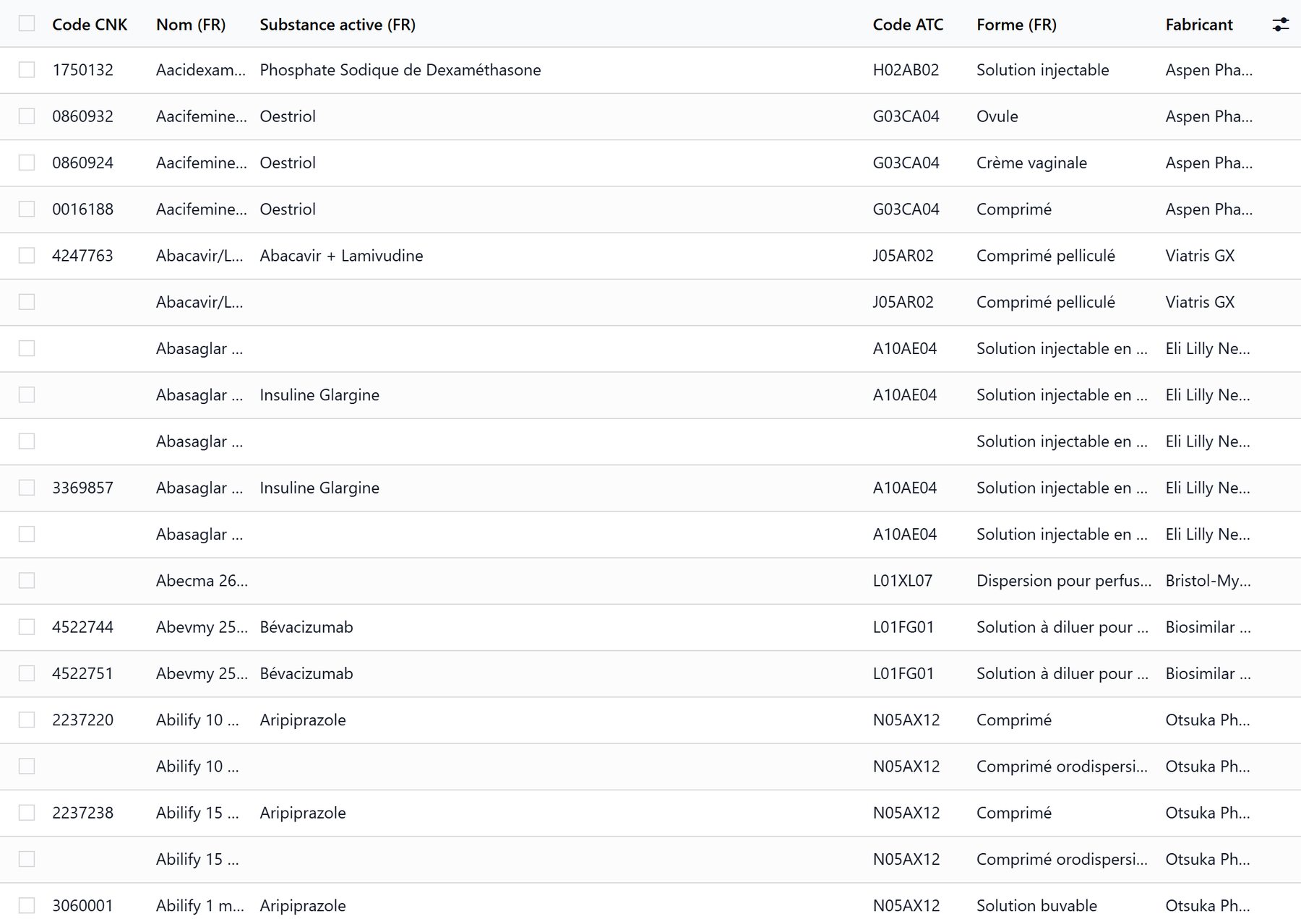
On the Medicines workstation, Catalogue tab, SAM Database opens the local copy of SAM, read-only. The list shows the CNK code, the name, the active ingredient, the ATC code, the form, the manufacturer and whether the package is already in the catalogue.
Search by name or CNK.
Filters: Prescription Required, Black Triangle, With CNK; groupings by ATC Code, Form and Manufacturer.
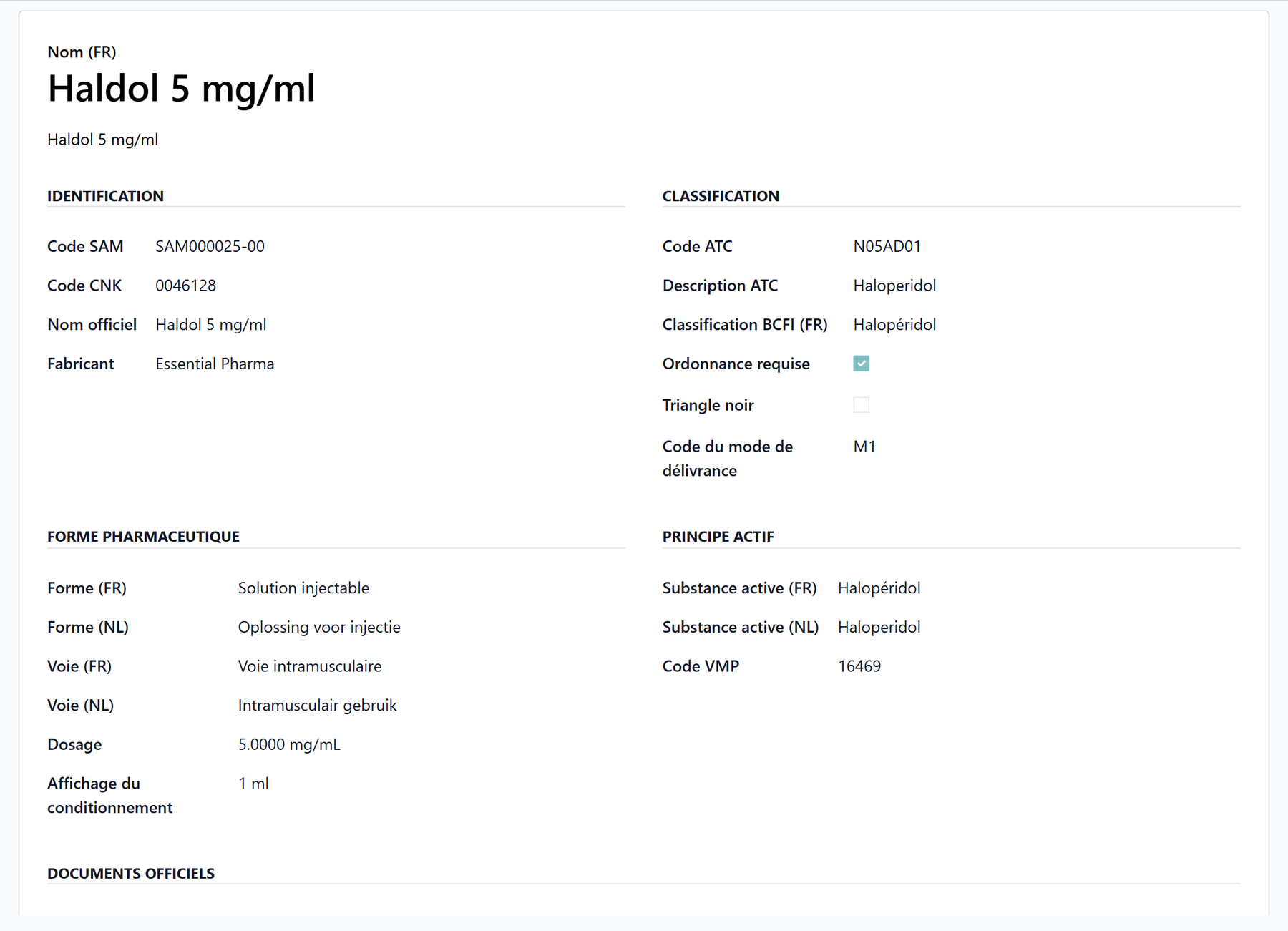
A record details the identification (CNK, official name, manufacturer), the classification (ATC code and description, BCFI class, prescription required, black triangle, delivery mode), the pharmaceutical form and route (FR and NL), the active ingredient, and the official documents (SmPC and leaflet in French and Dutch, BCFI page).
Tick one or more packages and click Add to Catalogue: each becomes a medicine of the catalogue, filled from SAM.
Search SAM for a medicine already kept
On a medicine’s SAM tab, Search SAM (medication manager) opens the search window, pre-filled with the medicine’s name:
Choose By Name or By CNK Code, type the term and click Search SAM. The search ignores accents and accepts several words (Amlodipine 5mg).
The results show, per package, the CNK, the black triangle, the name, the active ingredient, the strength, the form, the price, cheap, off market and narcotic, and in optional columns the manufacturer, the ATC code, the BCFI class and the SmPC and leaflet links. In Catalog says whether the package is already in the catalogue.
Toggle Select on the right package, then Update Medication (or Import Selected to add packages to the catalogue). Search Again starts over.
A package whose CNK is already in the catalogue updates that medicine, which keeps the name the house gave it, instead of creating a second one.
Refresh from SAM reads the SAM data of a medicine again from its CNK.
The catalogue without CNK
A medicine without a CNK code cannot be found by a pharmacy. The Medicines workstation shows a Without CNK smart button, and Catalogue Without CNK in its Catalogue tab, as long as such medicines remain. Link each one to its SAM package, or tick Not in SAM: Typed In for a product SAM does not list.
Key takeaways
SAM is the official Belgian medicines database, the starting point of the catalogue.
New in the catalogue starts with one search in SAM; the package fills the record and keeps its identity read-only.
The SAM Database door of the workstation lists the packages; Add to Catalogue imports them.
With the central service, the SAM tab shows price, reimbursement, availability and regulatory information, refreshed every night.
SAM carries no clinical text: indications, contraindications and allergens are the house’s to record.