Nutritional monitoring and undernutrition
WideCare screens for undernutrition and tracks each resident’s intake, drawing on the geriatric ESPEN recommendations and on established screening thresholds. Everything is read in the resident’s Nutrition tab and on the Meals statistics page.
The principle: you enter the weight and height, record the meals served and the drinks; WideCare derives an undernutrition risk status, targets for energy, protein and fluids, a coverage of intake, and raises alerts when a resident falls behind.
A screening tool, not a diagnosis
Nutritional monitoring helps the team spot frail residents early. It does not replace the assessment of a dietitian or a physician: the status and alerts are signals to be interpreted, not decisions.
The resident’s Nutrition tab
Open a resident, then the Nutrition tab. The clinical blocks (status, MNA, targets, intake) only appear for the residents whose care the home follows; a resident the home only feeds keeps the diets, texture, allergies and preferences.
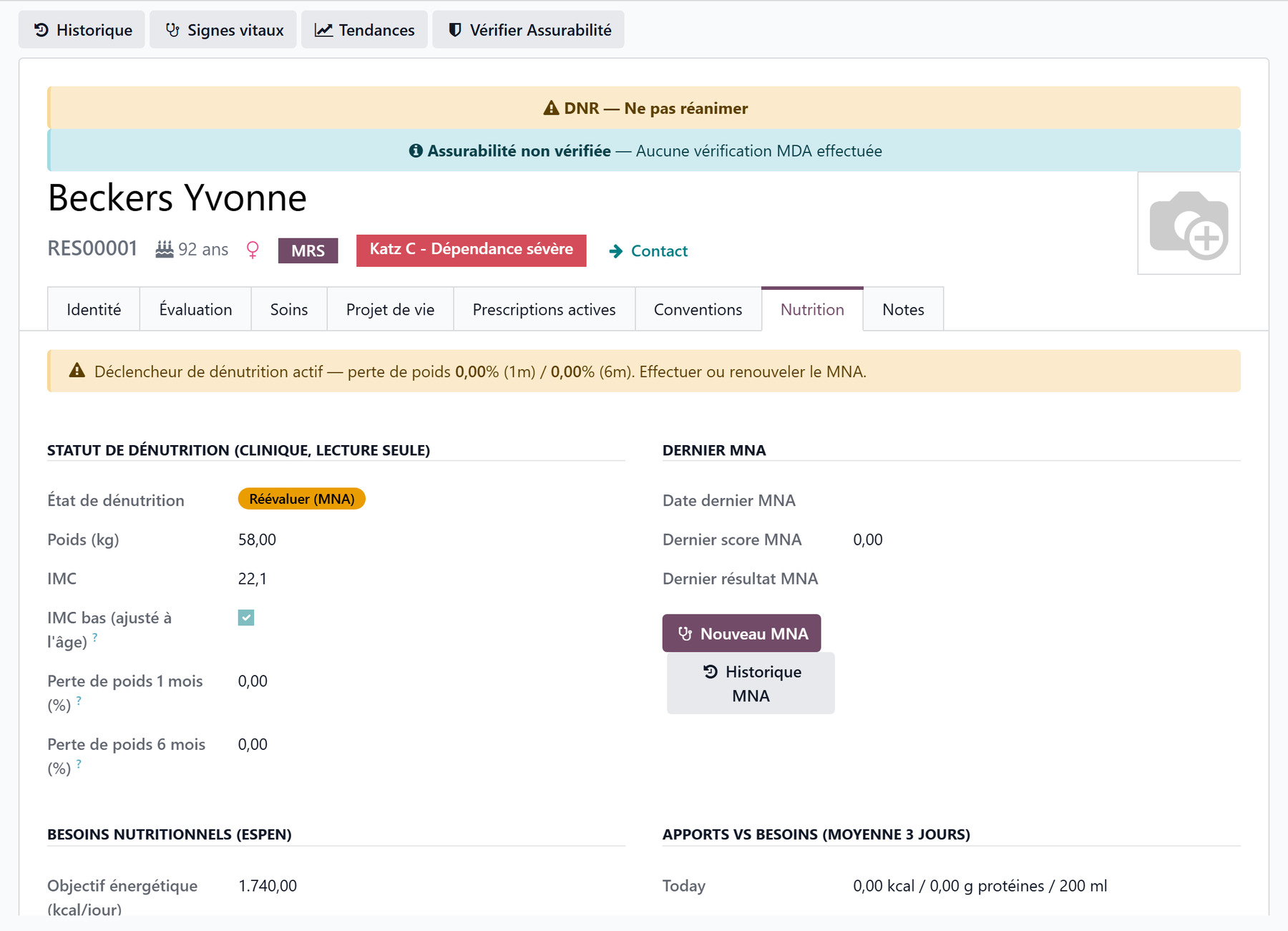
The undernutrition risk status
The Undernutrition Status block is computed by WideCare: you do not edit the status by hand. It shows a coloured badge and the measurements that explain it.
Displayed status |
Meaning |
Badge colour |
|---|---|---|
No concern |
No screening signal |
Green |
To monitor |
Last MNA “At Risk” |
Blue |
Re-screen (MNA) |
A screening signal is active: redo or renew the MNA |
Orange |
Undernutrition |
Last MNA “Malnourished” |
Red |
Below the badge: the weight, the Height (cm), the BMI, Low BMI (age-adjusted) and the weight loss over 1 month and over 6 months.
Enter the height here
The height is entered directly in the tab. Without it, WideCare shows Height missing: the BMI cannot be computed and the low-BMI criterion is not evaluated, so a thin resident who has not lost weight is not caught.
flowchart TD
    A[Weight, height and BMI up to date] --> B{Last MNA = malnourished?}
    B -- Yes --> C[Undernutrition]
    B -- No --> D{Screening signal active?}
    D -- Yes --> E[Re-screen MNA]
    D -- No --> F{Last MNA = at risk?}
    F -- Yes --> G[To monitor]
    F -- No --> H[No concern]
What triggers “Re-screen (MNA)”
A screening signal is active as soon as one of these conditions is true:
weight loss of more than 5% over about 1 month;
weight loss of more than 10% over about 6 months;
BMI below 23 in a resident over 70 (age-adjusted threshold);
overdue MNA: no MNA, or a last MNA more than 6 months old (not for someone who only comes by day).
In Belgium
These thresholds are the default values of the AViQ screening (PWNS-be-A). See Care in Belgium.
When the status is Re-screen (MNA) or Undernutrition, a banner at the top of the tab recalls the weight loss and asks to perform or renew the MNA.
Weigh regularly to get the weight loss
The weight loss over 1 and 6 months is computed from the weights logged in the vital signs. Without regular weigh-ins, WideCare cannot compare and these percentages stay at zero.
The latest MNA
The Latest MNA block shows the resident’s most recent MNA (Mini Nutritional Assessment): date, score and result (Normal, At Risk, Malnourished).
New MNA opens a new MNA pre-filled for this resident, with the BMI band already chosen from their known BMI.
MNA History opens their previous MNAs.
The MNA-SF is a 14-point scale: 12–14 = normal, 8–11 = at risk, 0–7 = malnourished. It is the MNA that switches the status to Undernutrition or To monitor. See Clinical registers.
The ESPEN targets
The Nutritional Needs (ESPEN) block shows the targets specific to the resident, derived from their weight and sex:
Target |
How it is computed |
|---|---|
Energy Target (kcal/day) |
Weight × 30 kcal/kg (or 35 if BMI less than or equal to 21) |
Protein Target (g/day) |
Weight × 1 g/kg |
Fluid Target (ml/day) |
1600 ml (women) / 2000 ml (men) |
The coefficients are set once for the whole home in Meal and nutrition settings.
Intake vs needs (3-day average)
The Intake vs Needs (3-day avg) block compares what the resident actually consumed with their targets.
Today — the day’s intake: kcal, protein (g) and fluids (ml).
Energy Coverage, Protein Coverage and Fluid Coverage — the 3-day average as a percentage of the target.
Nutrition Deficit and Hydration Deficit — ticked when coverage falls below the configured threshold (75% by default).
Log Drink records a drink for this resident; Hydration History opens their drinks.
How the average is read:
Only the meals served or refused count as recorded; a place laid but not dealt with is not a meal.
A resident admitted less than three days ago is averaged over the days since their arrival.
A resident who eats only some meals in the home is compared with the share of the day those meals represent (Share of the Day’s Needs of the meal types), on the days they came.
Nothing recorded is not a good score
When no meal or no drink was recorded over the last three days, the tab says so (No meal recorded over the last three days, No drink recorded over the last three days) instead of showing a coverage, and no deficit is raised. Record the round and the drinks: see The meal round.
Diets, textures and preferences
Diets and Textures — Dietary Regimes, Texture, Meal Autonomy (Autonomous, Supervised, Assisted, Fed) and Notify Family of Meals (the family e-mails, see Family portal and public menu).
Food Allergies — the food allergies of the resident.
Preferences and Dislikes — what the resident likes and does not like; carers see them at the table in the care app.
See Menus, diets and allergies and Food textures (IDDSI).
Logging food intake
Energy and protein intake comes from the meal round: after each meal, record the Amount Eaten of the plate (Not Eaten, 25%, 50%, 75%, Fully Eaten), at the desk or in the care app. A refused plate counts as not eaten.
WideCare multiplies the per-portion values of the dishes served by this percentage. The dishes must carry their values and portions: see Dishes and nutritional values.
For the residents followed for nutrition (status at risk or confirmed, a deficit, or an Intake monitoring care at that meal), the amount is owed: their plates carry Intake Required and the Amount to Note filter lists the ones still missing.
Recording hydration
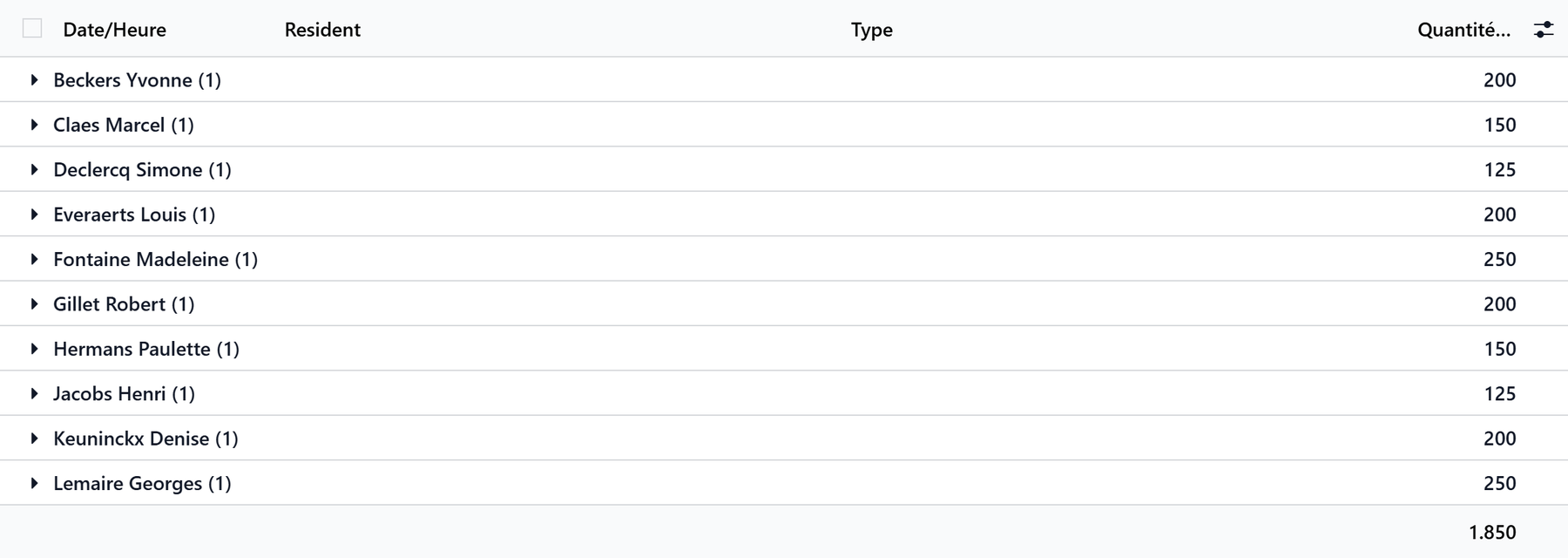
Drinks are logged in Meals → Operations → Hydration, a list you fill in directly. It opens on today’s drinks grouped by resident, with the daily total. Each line records the date and time, the resident, the Type (Water, Coffee / Tea, Juice / Soft drink, Milk / Dairy, Soup / Broth, Oral supplement, Other) and the Amount (ml).
You can also log a drink from the Nutrition tab with Log Drink, or on the floor with the Hydration screen of the care app, one tap per glass: see Meals and drinks in the care app. A glass logged there also marks done the Hydration round care of its period.
The nutrition dashboard
Open Meals → Reporting → Statistics. Below the cards Residents, Menus, Warnings and Critical (the last two open the alerts), three banners appear when they concern at least one resident:
Banner |
Residents concerned |
Button |
|---|---|---|
Undernutrition risk (red) |
Re-screen (MNA) or Undernutrition status |
Review opens these residents |
Nutritional deficit (orange) |
Intake below the ESPEN target |
Review opens these residents |
Hydration deficit (blue) |
Fluid intake below the target |
Review opens these residents |
The Today’s Service card at the bottom shows the meals served, pending and absent today.
The automatic alerts
Every day, WideCare refreshes the screening, the targets and the coverage, then creates activities for the residents who fall behind. Each alert is repeated at most once every 30 days per resident.
Alert |
Condition |
Recipient |
|---|---|---|
Undernutrition — perform/renew the MNA |
Re-screen (MNA) or Undernutrition status |
Head nurse, otherwise manager |
Nutrition deficit — intake below target |
Energy or protein coverage below the threshold |
Kitchen staff, otherwise head nurse, otherwise manager |
Hydration deficit — fluid intake below target |
Fluid coverage below the threshold |
Kitchen staff, otherwise head nurse, otherwise manager |
Set the deficit threshold
The 75% threshold that triggers the deficit alerts is changed in Intake deficit alert of the Meal and nutrition settings. Lower it to be alerted later, raise it to be alerted earlier.
Key takeaways
The Nutrition tab gathers the undernutrition status, latest MNA, targets and intake coverage; enter the height there.
The undernutrition status follows the screening rules: weight loss, age-adjusted BMI, overdue MNA or “Malnourished” MNA.
The targets are specific to each resident, from their weight and sex.
The intake comes from the amount eaten at meals and the logged drinks; coverage is a 3-day average, and an empty record is said, not scored.
The Statistics page and the daily alerts surface the residents at risk; this monitoring does not change the care allowance.