Recording attendance
The attendance register is what the whole day care centre rests on: it decides the forfait, the day price and the care. It holds one line per user and per day, with the arrival and departure hours.
Today’s attendance, at the door
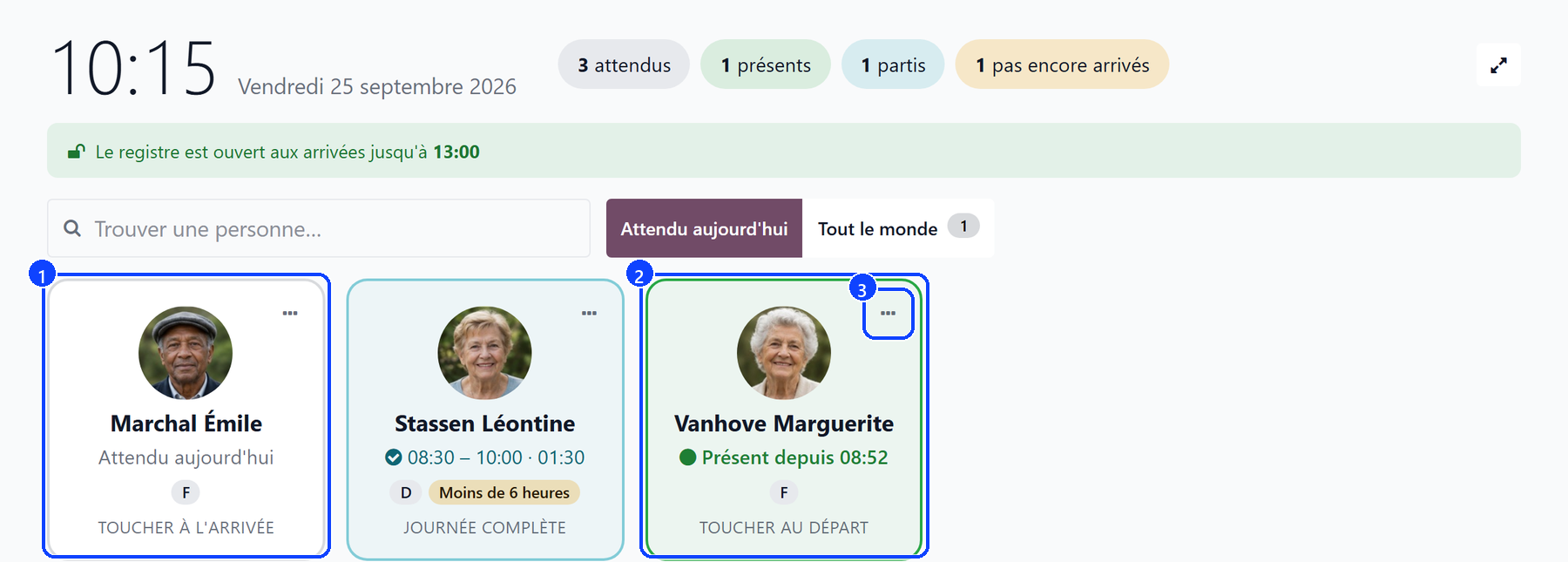
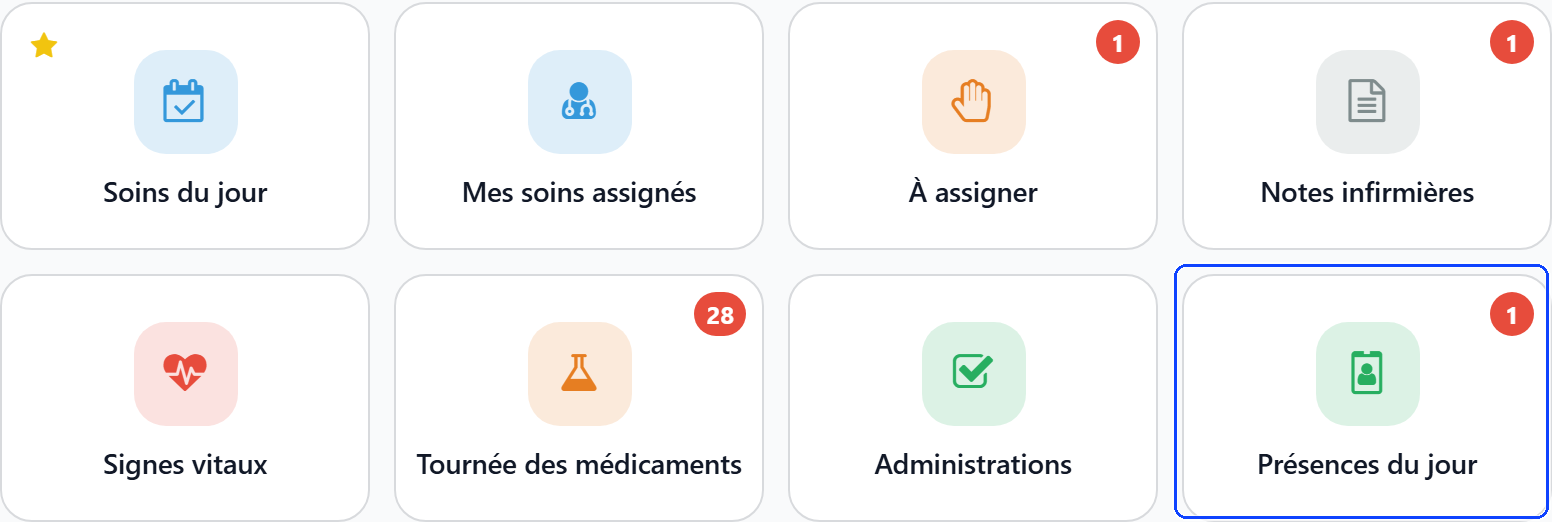
Day care centre → Today’s attendance opens a screen made for a tablet at the entrance: one card per day care user, with their photo. The same screen opens from the Today’s attendance tile of the care board.
When a user arrives, tap their card (1): the arrival is recorded at the current time.
When they leave, tap it again (2): the departure is recorded, and the card says whether the day earns the forfait, or why not.
Tapped the wrong card? Click Undo in the confirmation that appears.
To type the hours by hand or record a day cut short, click the card’s ⋯ button (3): it opens the Add a day of attendance dialog.
At the top of the screen:
the counters expected, present, left and not arrived yet filter the cards on their group; tapped again, they show everyone;
Find a person… searches by name;
Expected today lists the users expected today: on the weekdays agreed with the family, otherwise on the days the centre opens. Everyone also shows the others, for an unplanned visit;
Calendar opens the register’s month, and the full-screen button hides the rest of the app.
A banner says what the register allows now: open to arrivals until 13:00, or closed to arrivals. Others say when the centre is closed today, when more people came than the approval licenses places, and when users of a sector you are not assigned to are not shown.
Every tap goes through the register: the 13:00 closure, the audit log and the forfait rules apply exactly as in the register.
A user on a declared absence — a holiday, a stay in hospital — is not expected: the card says since when they are away. See Absences and hospitalisation.
From 13:00, a user expected and not ticked in stays on the screen, marked Not ticked in by 13:00: the register counts them absent. Tapping their card still records a late arrival, marked Recorded after closure.
From 13:00, Did not come on that card records an unannounced absence; Undo the absence takes it back.
Several screens can stay open at once: each one reloads every two minutes.
The tile’s badge on the care board counts the users expected today who have not arrived yet. It goes back to zero at 13:00, when the register closes to arrivals.
On the phone
The WideCare app carries the same screen: an Attendance card on the shift screen counts the users expected, not ticked in, and opens Today’s attendance. The users are grouped under To tick in, Here, Gone home and Not expected today.
Swipe a line to the right: Arrived, then Leaving.
Undo in the confirmation takes the tap back.
A tap needs the network: the hour of an arrival is the register’s clock at the tap. Without a connection, the app says so — tap again once the network is back.
A day already complete is corrected at the desk.
The register
Day care centre → Register → Day care register lists the days recorded, on the current month: one line per user and per day, with the arrival, the departure, the hours and whether the forfait is due. The Attendance smart button of a stay, and Attendance days on a user’s file, open the same list for one person.
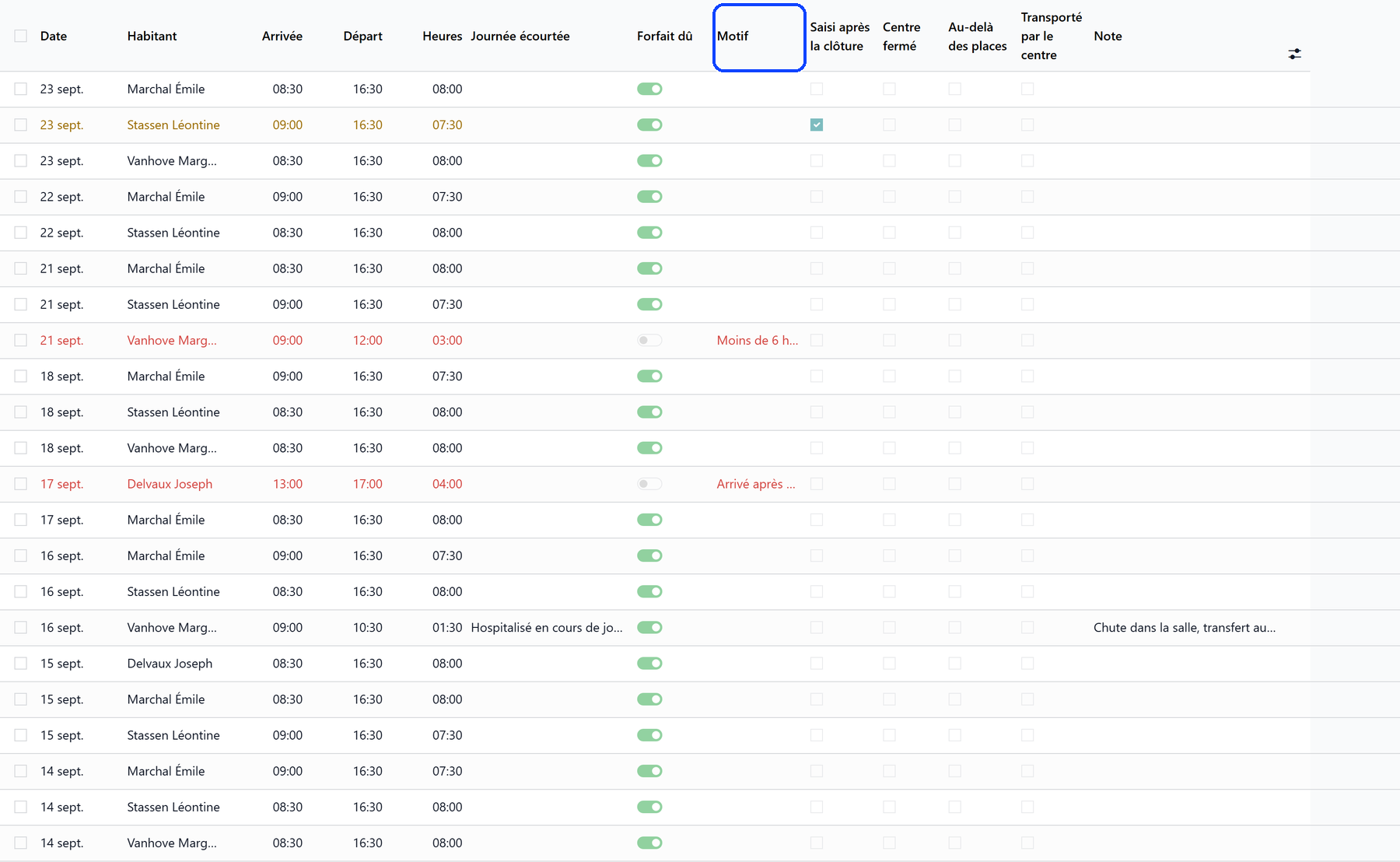
A day that earns no forfait shows in red, with its reason under Why Not Due; a day recorded after the closure shows in orange.
The filters Today, This month, Day Cut Short, Forfait not due, Recorded after closure, Centre closed that day, Over the places and Transported today narrow the list; it groups by resident, by date, by day cut short or by transporter.
Over the Places flags a day when more users came than the approval licenses places.
A day recorded on a day the centre does not open is flagged Centre Closed, with the reason, never refused: it is either a date typed wrong, or an exceptional opening.
Transported by the Centre says the centre drove the user in that day. It is ticked from the transport days of the stay, can be corrected on the line, and the transport supplement counts these days.
The date picker of a line offers only the days of the user’s care: from the admission to the last day of care.
The calendar
Switch the register to its calendar view to read the month: one colour per user, with a box per person to filter. A click on a day recorded shows the arrival, the departure, whether the forfait is due and the transport; a click on an empty day opens the full form.
Tick who came on a day
To complete or correct a whole day, click Tick who came on a day at the top of the register. The dialog Who came on (date) lists every day care user whose stay runs that day; the days already recorded come marked Present, with their hours.
Pick the Date (1): the calendar marks the days already in the register.
Switch on Present for the users who came.
Enter their arrival and departure hours: without them, the day earns no forfait. The Forfait column says, before saving, why a day would earn none.
Click Save the register.
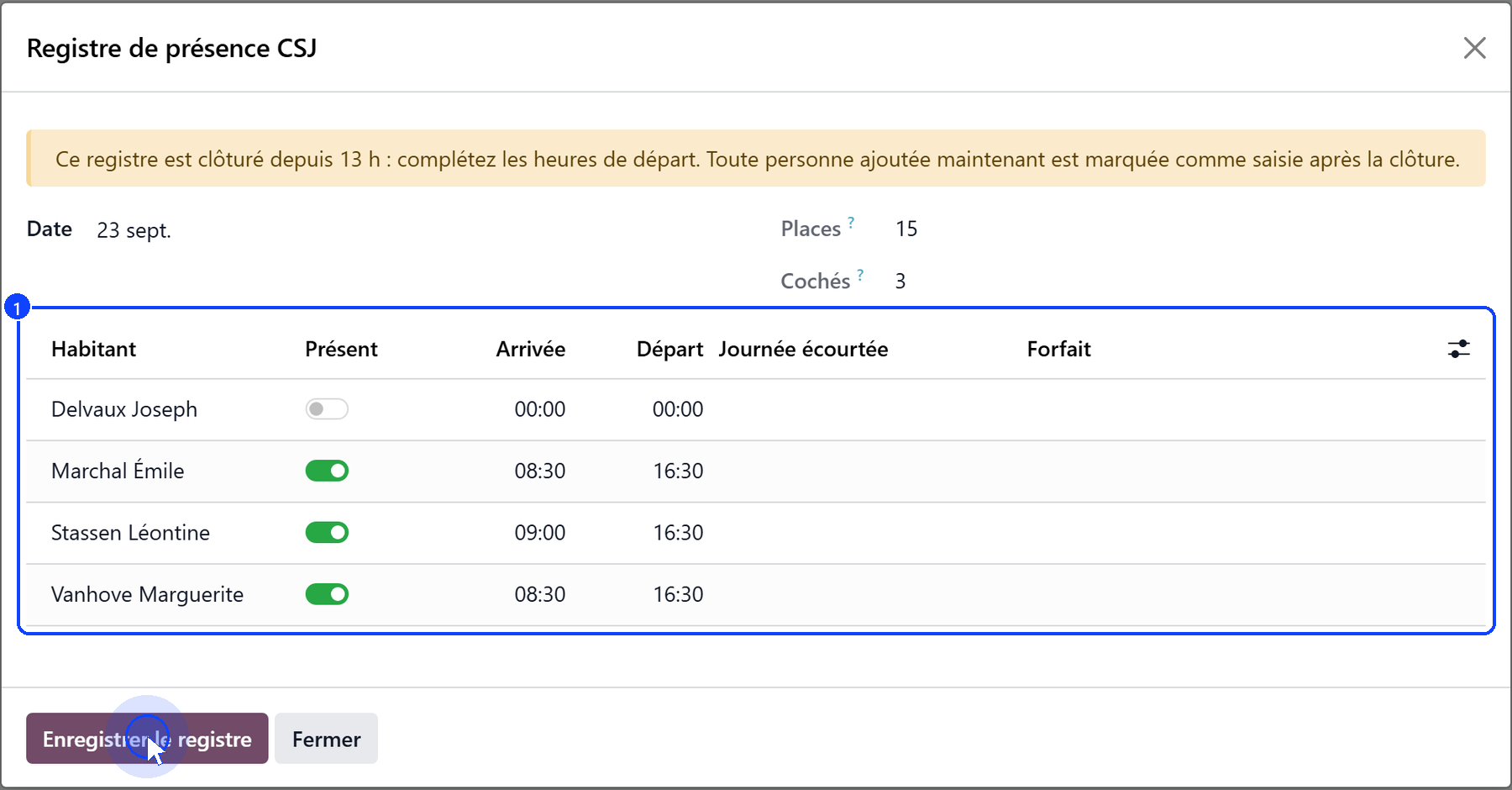
Next to the date, Places shows the places the approval licenses and Ticked the users marked present. More users ticked than places is said in a banner, never blocked: saving stays allowed.
The Absence column says when a user is away that day on a declared absence; the line is greyed.
Switching Present off removes the user’s day.
From 13:00 the banner says the register is closed: the departures can still be completed, and a user added now is marked as recorded after the closure.
On a past day, the banner says only a manager can amend it, and every change is logged.
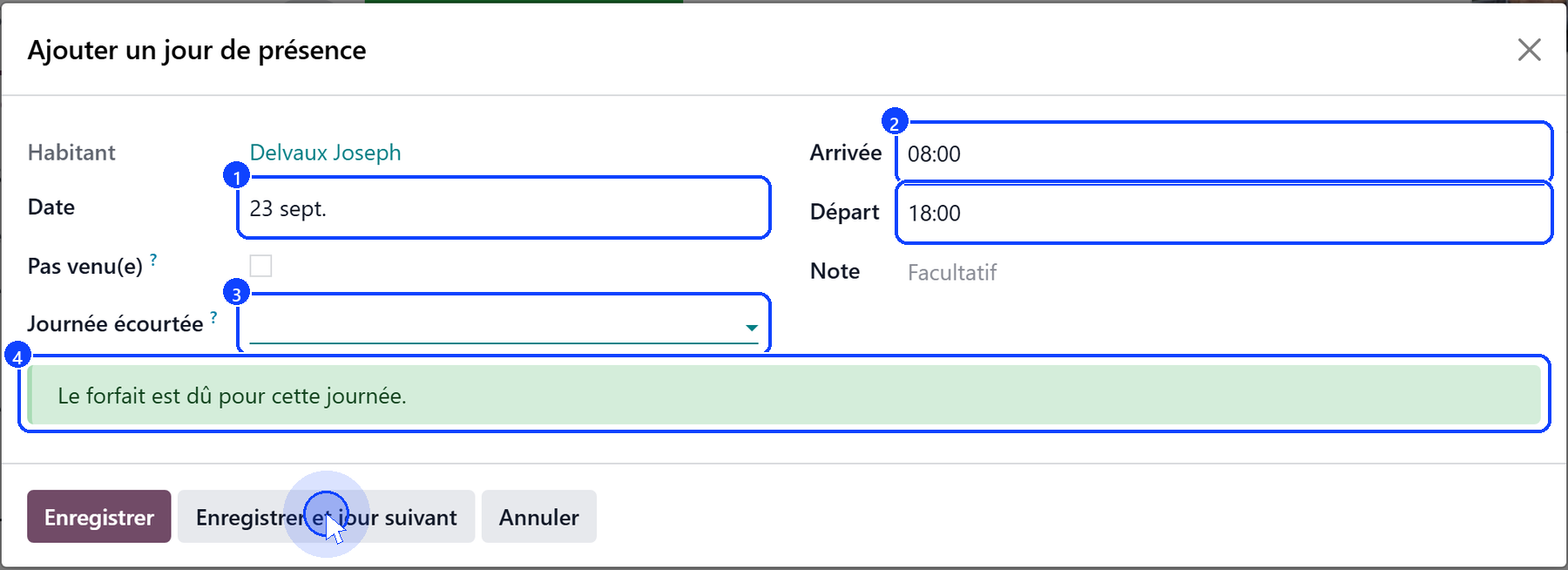
One day for one user
On the user’s file, Add a day of attendance opens a dialog for a single day — the right tool to catch up a fortnight for one person.
Choose the Date (1): today by default. Only the days of the user’s care are offered.
Check Arrival and Departure (2): they start from the centre’s hours.
If a hospitalisation or a death interrupted the day, choose it under Day Cut Short (3).
Read the verdict before saving (4): the forfait is due, or the reason it is not.
Click Save, or Save and next day to move on to the following day.
A day already in the register is loaded, never doubled: saving updates it.
On a day the centre is closed, a banner says so, with the reason: an exceptional opening is yours to record, a date typed wrong is not.
When the user is away on an absence under way, a banner says that the day recorded brings them back: the absence closes at the arrival.
Did Not Come records a day the user was expected and did not come, unannounced. Nothing is written in the register — which lists who came —: the day goes in as an unannounced absence. See Absences and hospitalisation.
The next day always starts blank, on the centre’s hours.
A notification confirms each day saved, and says whether the forfait is due.
A day that earns the forfait
A day earns the forfait when the user:
stayed at least 6 hours, and
arrived by 12:00;
or when the day was cut short by a hospitalisation or a death, however short. Otherwise the register says why: Less than 6 hours, Arrived after 12:00, or Arrival or departure time missing.
A day that earns no forfait is still recorded: the user came, and the centre bills them its day price.
The 13:00 closure
Before 13:00, the register of the day is open.
From 13:00, it is closed to arrivals; departures can still be entered.
A past day can only be amended by whoever holds Day care / Amend a closed register day, and every change is kept in the audit log.
A line added after the closure is marked Recorded after closure.
A line deleted keeps what it said in the audit log.
Once the register has closed, its silence is an answer: a user who was expected and not marked present did not come that day.
Print the register
Day care centre → Register → Print the day care register prints the register for an inspection, between From and To:
One table per month, or One page per day;
every line of the period, with its hours, whether the forfait is due and what the register says about it — (R) marks a line recorded after the closure.
Printing is logged. The entry is shown to whoever may amend a closed day.
What’s next
Absences and hospitalisation — a holiday, a day in hospital, a day nobody announced.
Billing a day care month — what the days recorded become on the invoices.
Care for a day care user — how the register decides the care of the day.