The candidate’s file
The request is where the candidate’s file is built, without leaving the pipeline. Everything typed here is kept on the future resident’s record: it is the same person, before and after the admission.
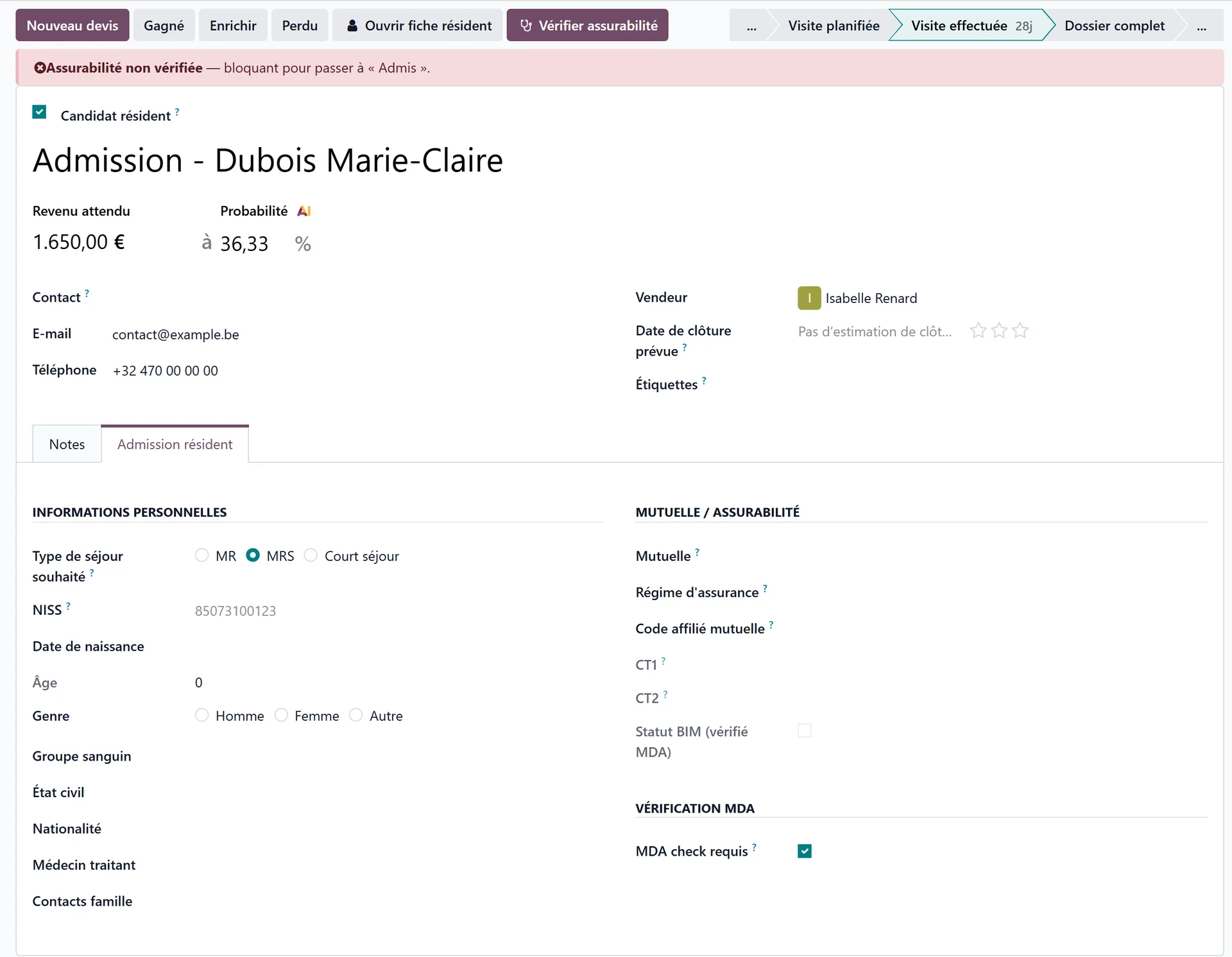
The top of the request
Photo of the candidate — click the image next to the title to add it. It is stored on the resident’s record and shown on the pipeline card, then on the resident card.
Resident candidate — ticked by default; see Admissions.
The title — the request is named after the person to admit.
Contact Person — the relative or social worker who called, with their Relationship; their e-mail and phone are theirs, not the candidate’s.
Resident Email and Resident Phone — the candidate’s own details.
Followed by — the person of the admissions desk in charge of the request.
The Open resident record button opens the future resident’s record at any time.
Personal information
Establishment — the house the request is for, shown when you work for several houses. Only the houses ticked in the company switcher are offered.
Desired stay type — offered according to the sectors the establishment is licensed for, each with its places free. It is not required to fill in the file, but it is required to admit: it determines the bed and the documents the health insurer expects. See the details opens the Places available table.
Room type — the type of room planned, each option with its beds free. It is what the family is told and what the price follows; the room number itself is chosen at admission.
Identity: ID card number and ID card expiry, Date of birth, Age, Gender, Blood type, Marital status, Nationality, Place of birth.
Resident language, Spoken languages, Religion.
Attending physician and Deputy physician.
Family contacts, phone, e-mail.
The Places available table
See the details opens a table of the beds of the establishment, room type by room type:
Column |
Meaning |
|---|---|
Room type |
The type of room; the one planned on the request is highlighted. |
Price per day |
The accommodation price of the type. |
Beds |
The beds of that type in the house. |
Free |
The beds free today. |
Waiting list |
The people already waiting for that type. |
Where the country licenses places per sector, the table also shows the places of each sector.
No approval on file
If the establishment has no approval recorded, no stay type can be offered. The banner This establishment has no approval on file yet, so no stay type can be offered appears, with a Record the approvals link — fill them in first.
In Belgium
The stay types are MR, MRS, the short stay and the day care centre; the identification number is the NISS, at the top of the request, read from the eID card if you wish (Reading the eID card). The tab also shows the candidate’s Katz (New Katz, Import a Katz) and, when the validated Katz points to another sector, suggests it with Apply: see Admitting a resident in Belgium.
Health insurer and insurability
This block records the resident’s health insurer and the membership details the country asks for.
Where the country has electronic exchanges with the health insurer, the block also carries an insurability check: one button queries the insurer and fills in the insurer and the membership details on its own. It needs the national identification number: without it, WideCare asks for it first.
The insurability check gates the admission
Where the check exists, moving to Admitted is refused as long as it has not succeeded. For a case that does not require it — a candidate with no national identification number, for example — untick the box that makes the check required.
If the answer comes back not insured, the admission is still possible: a banner warns that billing will have to be addressed to the resident, and the answer is recorded in the request’s history.
In Belgium
The block, Mutuelle / Insurability, holds the mutuality, the CT1/CT2 codes and the BIM status, and the check is an MDA request sent with Check insurability. On the pipeline list, Check insurability (MDA) checks the whole waiting list at once. See Admitting a resident in Belgium and Insurability (MDA).
Key contacts
Three roles, each with a box to tick when the person does not exist:
Emergency contact — or No emergency contact
Legal representative — or No legal representative
Trusted person — or No trusted person
The box matters: it tells the team that the question was asked, rather than leaving an empty field that looks like an oversight. A name typed in one of these fields opens a short contact form.