Shift screen
My shift is the first screen of the WideCare app. It answers the question of the start of a shift: where things stand, and what comes next.
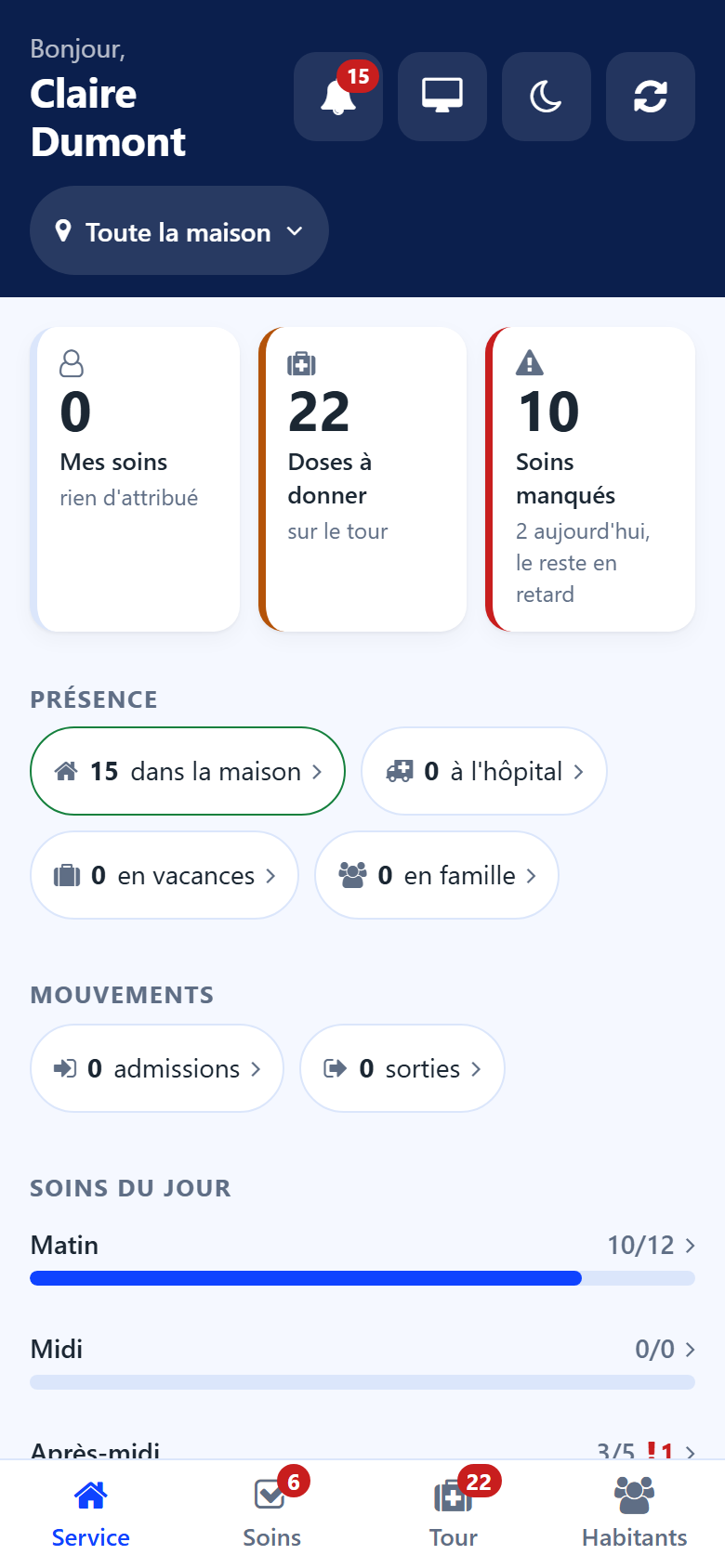
Cards
The cards depend on what your account does in the house. Tap a card to open the list it counts.
For the care staff:
My cares — the cares assigned to you today.
Doses due — the doses still to give on the round. The card turns red when doses were missed, and says how many.
Missed cares — the cares still owed: today’s misses, and the cares of an earlier day still owed because of their rhythm (a weekly bath, for example). The line under the figure says which: all from today, 3 today, the rest behind, or still owed from an earlier day.
For everyone who carries out the house’s tasks:
Tasks — the house’s tasks still open, and how many are assigned to you.
When your account works on them, the screen also shows:
the meal in progress — the couverts still to serve, then, after the meal, Amounts to note. See Meals;
Hydration — the residents without a drink today. See Hydration;
To prepare and To clean — the rooms to get ready before an arrival and to clean after a departure. See Rooms.
In Belgium
A house with a day care centre also gets an Attendance card: the day care users expected and not ticked in yet. See Recording attendance.
Card colours
Red — something was let slip: doses or cares missed. To handle now.
Warm — work is waiting.
Calm — nothing is waiting.
Until the shift is read, a card shows a dash instead of a figure: the app never states a zero it has not checked.
Presence and movements
Presence — residents in the house, residents away (hospital, holiday, family: one figure for every absence), and residents back today. A house with a day centre also counts the people at the day centre.
Movements — the day’s admissions, the residents admitted in the last 7 days, the day’s departures, and the residents deceased this week.
Every figure opens the list of the residents it counts. A button above the list reminds which figure you came from; tap its cross to see everyone again.
Today’s care
One bar per period of the day — morning, noon, afternoon, evening, night — shows the cares done out of the cares planned. A red number marks the missed cares of the period. Every period is shown, an empty one too.
Tap a bar to open the cares of the day: the missed ones first, else what is still to do, else what was done.
Next
The next cares and doses, in time order, with the resident and the room. A care that is part of a sequence for the same resident shows its rank. Tap a line to open the resident’s sheet.
When nothing is waiting, the screen says so: Nothing is waiting. The shift is up to date. When a team is chosen, it says the message concerns that team only.
The foot of the screen gives the number of residents of the sector and the date.