Room housekeeping
A room has two independent states: who occupies it, and where it stands in the housekeeping cycle. WideCare tracks them separately, because they answer two different questions.
Menu: Nursing Home → Accommodation → Housekeeping.
Why two separate states
An occupied room can still be to clean, and a free room is not usable until it is ready. Merging the two would hide exactly the case that matters: a room that looks available but is not yet.
The four stages
Stage |
Meaning |
|---|---|
To prepare |
A resident is due to arrive; the room must be made ready. |
To clean |
The room has been vacated and awaits cleaning. |
In progress |
Cleaning or preparation under way. |
Ready |
The room can receive a resident. |
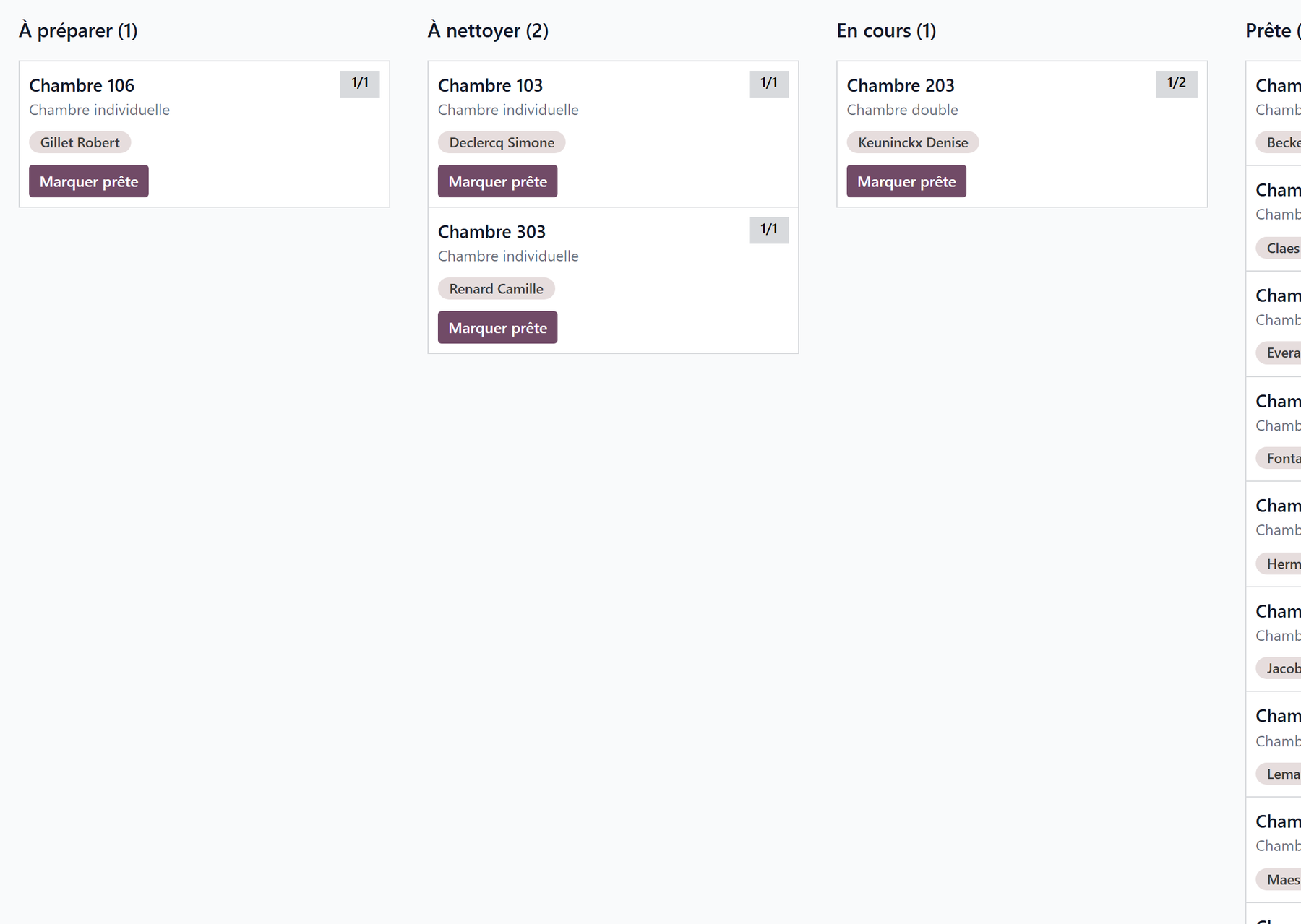
Each card shows the room number, its occupancy badge (the same colours as the rooms board), its type and its occupants.
How a room moves through them
WideCare sets the starting point and creates the matching staff task for the housekeeping team:
an arrival (admission, room change, transfer) puts the room in To prepare, with a Prepare the room task due on the arrival day;
a room being left for another one puts it in To clean, with a Put the room back in order task;
the end of a stay (departure, death, transfer elsewhere) puts the freed room in To clean, with a Clean the room task due on the end date.
From there, the team drives the room:
drag and drop the card from one column to the next;
Mark ready on the card closes the cycle in one click;
or work from the tasks: Start puts the room In progress, Done puts it Ready.
The board and the tasks always agree. Dragging a room to Ready closes its open housekeeping tasks (with the comment Marked ready on the board); dragging it to In progress starts them. A room with an arrival to prepare and a departure to clean only becomes Ready once both are done.
Note
A waiting-list room and a shared day place never enter the board: nobody moves into them.
Empty columns stay visible
Every stage keeps its column, even with no room in it. An empty To clean is not noise — it is the signal that nothing is pending.
On the phone
Where the WideCare field app is installed, the shift screen shows two cards, To prepare and To clean, with the time of the first arrival or the number of rooms in progress. They open the Rooms screen:
the rooms are grouped In progress, To prepare and To clean, with a Late chip when the task is overdue;
Start puts the room in progress, then Ready closes it;
Undo takes back a tap made by mistake.
A tap needs a connection: the stage of the room at that moment is what counts. A room handled at the desk says Handled at the desk. See Care on mobile.
Key takeaways
Housekeeping is independent of occupancy: the two are tracked separately.
Arrivals and departures set the starting point and create the tasks.
The board is driven by drag and drop, with Mark ready as the shortcut; the tasks and the phone move the same board.