Meals
The Meals application organises the home’s catering: the menus of each day, the dishes and their nutritional values, the diets, allergies and textures of each resident, the meal round, the nutritional follow-up and hydration, through to the family portal and the menu displayed in the dining room.
The dashboard
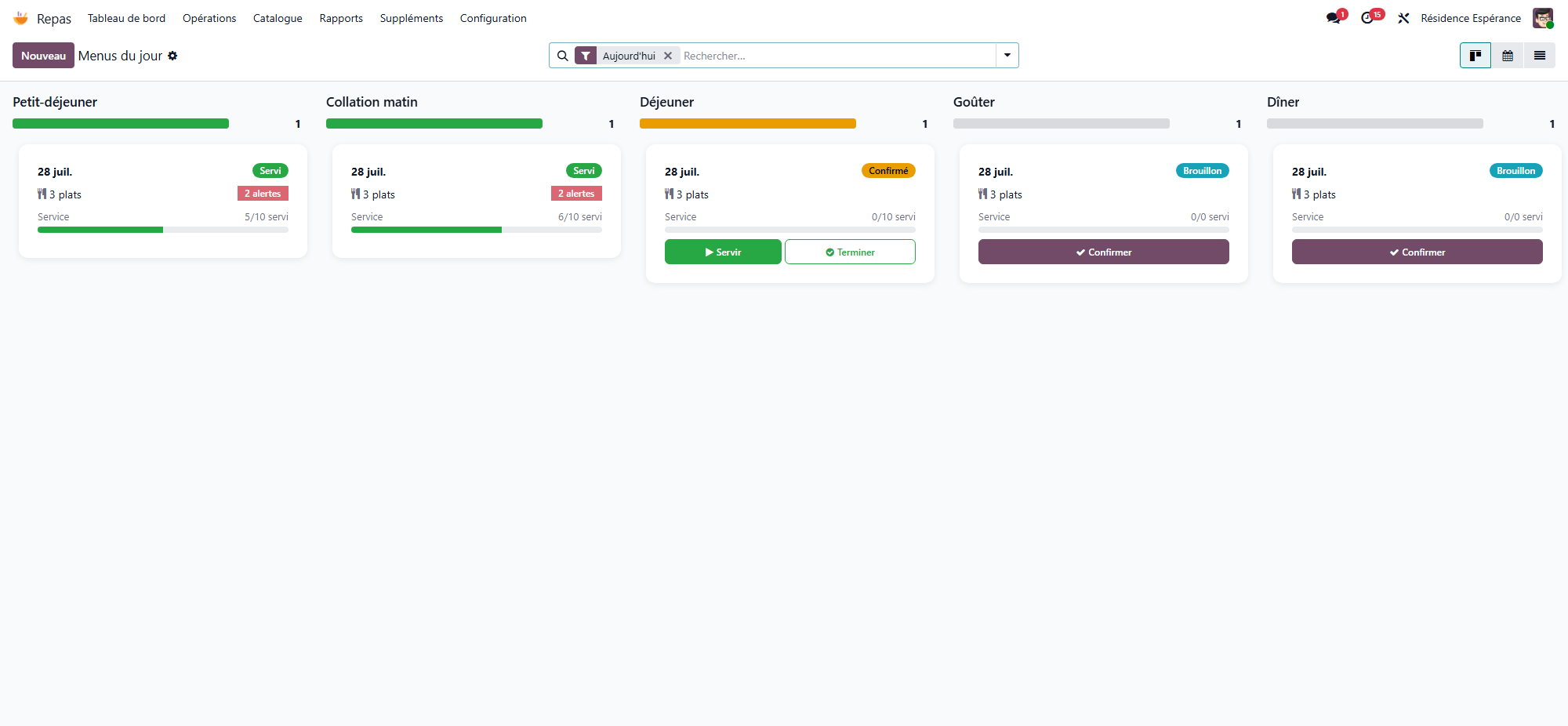
Meals → Dashboard shows the day’s menus as cards, one column per meal type (breakfast, morning snack, lunch, afternoon snack, dinner). Each card gives the menu status, the number of dishes, the number of dietary alerts and the progress of the service (served / total).
Create Today’s Menus creates the missing menus of the day, one per meal type.
Alerts opens today’s dietary alerts.
On a card, Confirm confirms a draft menu, Couverts opens the places laid for that meal, and Complete marks the menu as served.
What the application covers
Menus, diets and allergies — one menu per meal and per day, the diets and allergies of each resident, and the dietary alerts. → Menus, diets and allergies
Dishes — the dish catalogue, ingredients and nutritional values. → Dishes and nutritional values
Textures — the IDDSI textures for residents with swallowing difficulties. → Food textures (IDDSI)
The meal round — who is served, where, and how much they ate. → The meal round · → Meals and drinks in the care app
Nutritional follow-up — undernutrition screening, targets, intake and hydration. → Nutritional monitoring and undernutrition
Families and dining room — the family portal, the public menu, the printable menu and the kiosk. → Family portal and public menu
Main menus
Dashboard — the day’s menus, by meal type.
Operations — Menus, Meal Services, Distribution, Dietary Alerts, Hydration.
Catalog — Dishes, Dish Categories, Products.
Reporting — Statistics: the day’s figures and the nutrition banners.
Supplements — a shortcut to the Supplements application, shown only when that application is installed and only to administrative users.
Configuration — Settings, Dietary Regimes, Textures, Allergies, Meal Types.
A kitchen role
The Kitchen Staff role lets you entrust the menus, dishes, diets and allergies to the kitchen team, without opening the medical record to them.