Family portal
The family portal gives relatives a window onto the resident’s stay: what the team writes day to day, the documents handed over, the invoices, and — if the family has consented — a summary of the care.
The family portal is an application of its own. Once it is installed, its menu Nursing Home → Family Portal appears, with Family Spaces, Accesses and Shared Documents.
Two ideas to keep apart
Contact person — a name, a relationship and a phone number in the resident’s record. It opens nothing.
Access — the authorisation itself, granted to one person for one resident, with what they may see. This is what opens the portal.
The two meet on the same line: in the resident’s Contact Persons list, each relative carries a Portal Access status and a Portal button that opens their access to this resident.
A relative may hold accesses to several residents (both parents, for example); each one is granted separately, with its own scopes.
What the access opens, scope by scope
Scope |
What it shows |
|---|---|
Liaison Notebook |
What the team writes, and the family’s replies |
Documents |
The documents handed over to the family |
Meals |
The menus and how the meals went |
Invoices |
The resident’s posted invoices, and their PDF |
Health |
A care summary — requires a recorded consent |
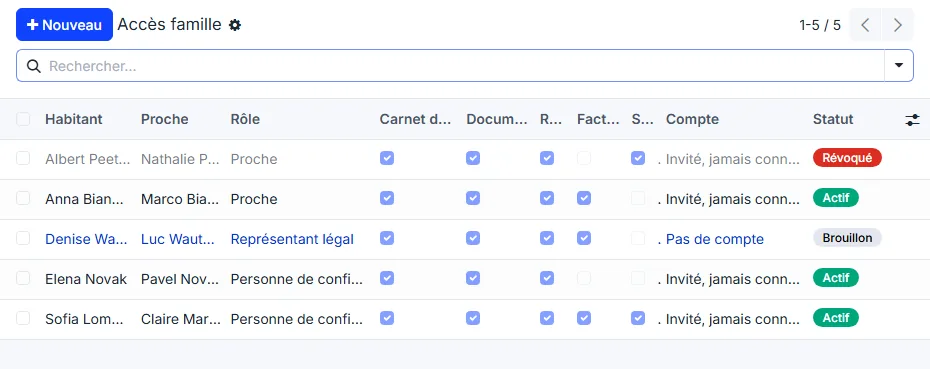
Liaison Notebook, Documents and Meals are ticked by default; Invoices and Health are not. Meals only shows something when the Meals app is installed, Health shows more than the dependency category when the care app is installed.
Health is never opened without consent
Ticking Health requires recording who gave the consent and when. WideCare refuses the access otherwise. Every reading of the health panel is logged, as is every access granted, changed or revoked.
The status of an access
Status |
Meaning |
|---|---|
Draft |
Prepared, not yet sent: the relative sees nothing. |
Active |
Invited: the relative sees what the access opens. |
Revoked |
Taken back, by hand or because its validity date has passed. |
On the resident’s contact persons, the Portal Access column says the same thing from the relative’s side: Not invited, Invited, never signed in, Signed in or Revoked.
The resident’s family space
Each resident has a family space, created the first time it is needed — with the Family Portal button of the resident’s record, or the first time an access is opened. Nothing is created for a resident whose family never uses the portal.
The space gathers the accesses, the shared documents and, in its discussion thread, the liaison notebook: what the team posts there as a message is what the family reads.
What’s next
Granting an access — invitation, scopes, consent, revocation.
Notebook, documents and invoices — what the team publishes.
What the relative sees — a tour of the portal pages.
Resident documents — the full document folder, which stays with the team.