Manage a resident
This page describes the resident in WideCare: the list, the record, and the stay that links them to a room, from the admission to the departure.
The resident list
Open Nursing Home → Residents → All Residents. The residents are shown as cards; switch to the list view for a table.
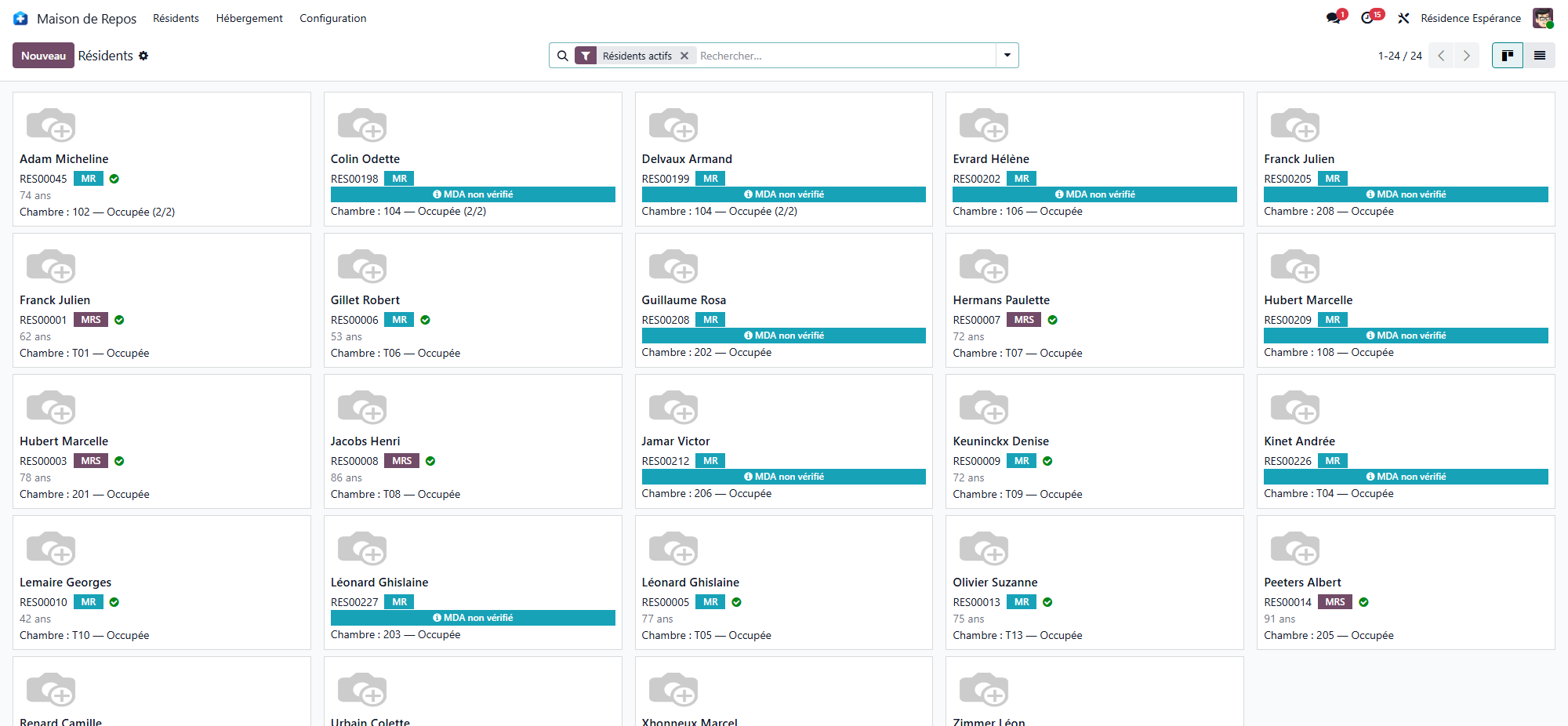
Each card shows:
the name and the resident code;
the age, the sex, the dependency category and the stay type (with Short stay when it applies);
the e-mail and phone, when they are known;
the room (a sun instead of a bed for someone who comes by day);
the photo, and badges for what calls for attention: Expected, Left, In hospital, Deceased.
The list view adds the room, the stay type, the admission and, as optional columns, the stay start, the admission time and the date of birth.
Filtering
Present, Expected, Left and Deceased — the list opens on Present;
the left panel filters by Gender and by Sector (the stay type);
Group By Room or Sector/Floor;
search by name, resident code, room or sector.
The resident record
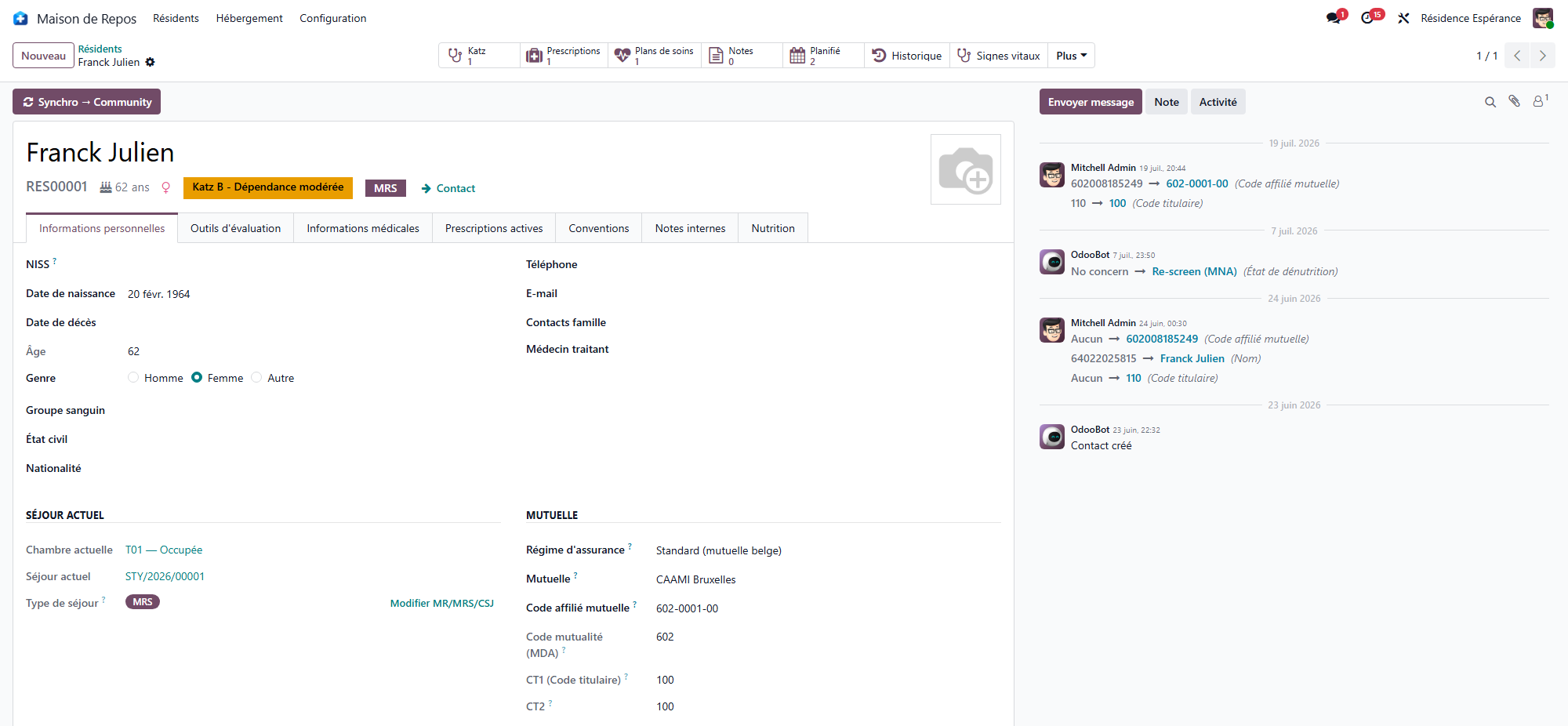
At the top: the photo, the name, the resident code, the age, the sex and the stay type. Ribbons flag an Expected resident (arrival booked), a resident In hospital, and a banner a deceased resident. The smart buttons open the resident’s Tasks, their Supplements and supplements Envelopes and, depending on the apps installed, their care, their Pocket money balance (a red Pocket money overdrawn banner warns when it is negative), their Interventions (as soon as a ticket exists, see Technical interventions) and the Family Portal accesses (see Family portal).
When the care records are installed, a hospital stay goes through the Hospital departure button of the resident’s record, then Return from hospital, which comes first in the bar while the resident is away. See Hospital departure and return.
Tab |
Content |
|---|---|
Identity |
Date and place of birth, gender, marital status, nationality, ID Card Number and expiry, languages, religion, phone, e-mail, Attending Physician and Deputy Physician; the Current Stay (room, stay, stay start, admission dates, stay type); the Contact Persons and the Key Contacts. |
Evaluation |
The geriatric scales — see Geriatric assessments. |
Stay Agreement |
Every stay of the resident, the Recurring supplements agreed with them (Close supplements / Reopen supplements), and their private furniture — see The resident’s private furniture. |
Documents |
Everything printed or opened for the resident, in one place. |
Notes |
Internal notes. |
The ID Card Number keeps the number of the identity document presented at admission. It identifies the card, which expires and is renewed — not the person.
Contact persons and key contacts
Contact Persons lists the resident’s relatives: name, Relationship, phone and e-mail. Add a line looks up a known contact — a son who is the contact of both parents — or creates one in a short form.
Under it, the Key Contacts: Emergency Contact Person, Legal Representative and Trusted Person, each with a box (No Emergency Contact, No Legal Representative, No Trusted Person) to say that the question was asked and that there is none.
Where the family portal is installed, each contact line also carries its portal access — see Family portal.
In Belgium
The Belgian pack adds the NISS, the mutuality and the eID card reading, which fills the identity and the NISS straight from the chip, and the Verify Insurability button runs the MDA check from the record — see The resident’s file in Belgium and Reading the eID card.
The admission guide
While an admission is in progress, the header of the record names the one next step, and nothing else:
Create the stay — opens a new stay, or the draft already started.
Validate the admission — opens the confirmed stay, where you enter the admission date and click Start Stay.
When no button is shown, the admission file is complete.
In Belgium
The guide adds the Belgian steps — the Katz and the admission agreement — in their order: see Admitting a resident in Belgium.
The stay
The stay links the resident to a room for a period. It drives presence, billing and the end-of-stay procedures.
graph LR
  A[Draft] --> B[Confirmed]
  B --> C[Active]
  C --> D[Ended]
Status |
Meaning |
|---|---|
Draft |
Being prepared; the room, the resident and the stay type can still be changed. |
Confirmed |
The room is held; the resident is Expected. |
Active |
The resident lives here; billing runs. |
Ended |
The resident has left. |
Cancelled |
The stay was called off. |
Opening the first stay
An admission request opens the stay for you. For a resident created by hand:
On the record, open the Stay Agreement tab.
Click Create the first stay. The button shows only while the resident has no stay: later stays are opened by the admission, the room change or the readmission, which chain the dates.
Choose the Stay Type — one of the sectors the home is licensed for —, the Room and the Stay start date.
Save. The stay is Draft.
Confirming, then starting the stay
Confirm — the stay becomes Confirmed and the room is held. The Admission Date and Admission Time fields appear.
Start Stay — on the day the resident arrives, fill in the admission date and time and click: the stay becomes Active.
From Confirmed on, the resident, the room and the stay type are read-only: the room changes through Change Room, never by editing the field.
What starting the stay triggers automatically
When the stay starts, WideCare:
adds the resident to the open billing periods;
for a resident billed in advance, creates the first accommodation invoice for the admission month;
opens the month’s supplements envelope.
Two dates not to confuse
Stay start date: when accommodation billing begins (the room).
Admission Date: the resident’s effective entry, when the care allowance paid by the health insurer begins.
They are often identical, but can differ. The Current Stay of the record shows both, with the Original admission, which a room change never moves.
The stay record
Besides the dates, the stay carries the Daily Rate, the Invoice Address, the admission request it comes from and three tabs:
Admission — House rules handed over on, and the Admission Reason (the note typed at admission);
Departure — once the stay has ended: the reason, the date and time, the notes;
Notes — internal notes.
All the stays of the house are in Nursing Home → Accommodation → Stays, with the Running, Ended and Short stay filters.
The buttons of an active stay
Change Room — moves the resident, now or on a later date: see Room change and transfer.
End Stay — records the departure or the death: see Departure and death.
Cancel Stay — calls the stay off entirely (a stay opened by mistake): the room is freed and nothing is billed on it any more. A confirmation says what is at stake: it does not discard your edits, it cancels the stay.
Cancel Room Change — on a stay opened by a room change: the resident goes back to their previous room and stay.
Readmitting a former resident
When every stay of a living resident has ended, the Stay Agreement tab shows Readmit. The new stay opens pre-filled from the last one — room, stay type, entry date today — with a banner that says so: check the values, then save and confirm as for a first stay.
In Belgium
The readmission creates its eAgreement request with the right sub-type, depending on the time since the departure; a change of sector is the MR ↔ MRS internal transfer, and an absence can generate an Annexe 11 — see The resident’s file in Belgium.
Dependency category
The dependency category is what the care allowance paid by the health insurer relies on. The scale that produces it, and the way an assessment is entered and validated, come with the country pack: each country grades dependency on its own scale.
The resident card shows the category currently on file. Without a country pack, or while the resident has no valid assessment, no category is shown.
In Belgium
The scale is Katz: six criteria, categories O, A, B, C and Cd, entered from the record then confirmed and validated — see The Katz assessment.